Jekyll2026-10-27T03:16:34+00:00https://kenwhitesell.github.io/feed.xmlWhitesell on whatever…General thoughts and ramblingsKen WhitesellI was wrong about AI2026-10-25T00:00:00+00:002026-10-25T00:00:00+00:00https://kenwhitesell.github.io/2026/10/25/I-was-wrong-about-AII’m taking a brief break from my career retrospective to address a very current-for-me topic.
I am a skeptic
Through the years I’ve become extremely skeptical about new technologies. My luck with trying products - both hardware and software - that are new has been spotty at best.
So, when the hype started about AI, I was more than just a little wary. I’ve been through the cycle of “4th generation languages”, “CASE” tools (computer-aided software engineering), “UML” program generators (Unified Modeling Language), “Smart Code Completion”, etc.
All of these have been introduced with a great amount of hype, persistent sales staff, strong advertising campaigns, and positive reviews.
I’ve been involved with different trials and evaluations of many of them. I’ve been asked to judge their effectiveness and opportunities for use.
Most of them came up very short. They either required much more significant hardware than what we had available, making them too expensive for wide-spread adoption; or took an unacceptable length of time to generate the code; or didn’t allow for certain requirements to be modeled; or didn’t generate accurate code.
So yes, when general purpose AI started becoming available, my first thought was “Here we go again.”. Then I started seeing others using it with some erratic and dangerous outcomes, and that really turned me off.
Then, after seeing and hearing about more useful results, I started to believe that there might be some value in well-defined and well-constrained situations. But I remained skeptical - I felt like my situations were outside the range of what those tools could reasonably do.
Trying it myself
First steps
Then an opportunity arose for me to give it a try myself.
I have an old Perl / CGI based website that I’m currently supporting. I “inherited” it from the original developer about 10 years ago. The site is built as two separate parts. The first part accepts spreadsheets emailed to it, and uses the data in those spreadsheets to update data.
The second part are a set of scripts to display that data as web pages.
While I’ve been able to keep it running, and have made some minor improvements around the edges, I haven’t really been able to make any substantial changes.
I’ve been wanting to convert it to a Python / Django since the time I assumed responsibility for it, but it has never made it to the top of my list of priorities. (I can work in Perl a bit, but I’ve never really gotten comfortable with it. It’s definitely a “second tier” language for me.)
So I thought this site would be a perfect test case for me to try using AI. I decided to upload all the individual Perl scripts and a rather lengthy description of the system, its organization and objectives.
I also uploaded a set of sample spreadsheets and the data extracted from them, along with the html of the pages generated from that data.
I asked for a Django-based system. The spreadsheet-processing scripts were to be generated as custom management commands, the page scripts were to be converted to views. The html generated by the scripts were to be converted to templates.
It took a few iterations, some clarifications, and some digging for me to understand some parts of the original that I wasn’t familar with - but eventually I got a functional project.
It took me about a day, and I haven’t fully tested it yet, but so far it’s looking really good.
Project #2
The next project I wanted to attempt was to find a way to have a particular closed-source project generate its text output to a file.
The program produces that text to a panel within the application. I could have it print some, then copy/paste that to a file, print some more, copy/paste again, and repeat this process until I got all the output I was interested in. The program provided no facilities for writing that log out to a file.
I uploaded the program with some sample data files and their corresponding text logs that I had created using the copy/paste process.
I asked ChatGPT to find a way to have that program produce the log output and write it to stdout.
This only took me about half a day to get a usable program, but it works!
That’s two-for-two with very impressive results.
A serious project
My third attempt is something more real.
I decided to start a project from scratch. It’s a web-based version of an old board wargame, to run within my Django/Channels boardgame engine. I’ve already completed 4 other games in this engine, so I’ve got a pretty good handle on how to approach things - but this title is clearly my most ambitious project so far.
For some background, This is a typical early 80s wargame. The rulebook itself is 36 pages of 9 & 10pt text, the official errata and Q&A as of 1998 is 11 pages of 9pt text, and the unofficial rulings, decisions, and interpretations is at least that long. It’s a complex game that takes a day to learn. And after 43 years of playing it, people are still finding gaps and questions in those rules. (Granted, most of those are very low probability and extreme edge cases - but when you’re doing a computerized implementation, pretty much everything needs to be accounted for.)
When starting to look at doing this myself, I had easily estimated that it would take me at least six months to just get something running that I could show to people, and probably a year or more to have enough of it coded to open it up for outside testing.
Relying heavily on AI, it has only taken me two weeks to create a playable version to demo. It’s not complete - there’s still a lot of UI-related work to do, but I would have never imagined that I would have gotten this far this quickly. I can play some scenarios through to completion, and that has left me absolutely amazed.
There’s probably still about a month of work remaining, but the effort has been well worth it.
A board game port makes an interesting problem to solve, especially with any medium+ complexity game. The “business logic” is usually fairly well defined, as are the essentials of the UI.
There are lots of nits I could pick. Is it the class structure I would have designed? Absolutely not, but I can live with it. (I wouldn’t be surprised if it actually works out to be a better design than what I would have developed.)
Has it been perfect? Far from it. Some of the issues I have run into have been humorous, some simply aggravating, and some are addressing edge cases that have never been asked before.
As the saying goes, the devil is in the details. I think the most frustratingly tedious part of this process has been having to define the specific logging format for messages. I haven’t yet found a way to describe some of the patterns I would like to see used - and have the AI implement that across the board.
Of course, the AI doesn’t have any “feel” for the game. It has no basis for judging what information is worth displaying and what would just be useless verbiage. But defining those logs is something I would have needed to do anyway, so it’s not like it’s creating any “extra” work for me.
But right now I’m at the stage where I’m manually testing this by playing the game - seeing what all odd situations I can create to see how the engine handles it. I have to do this manually because I need to see what information is being presented, and how, to determine if it’s the information that a player wants and needs to see.
At heart I am quite pragmatic about this. What’s most important to me is that I have a functional game.
And so, I freely admit, I was wrong. An AI tool in the hands of someone who understands the problem to be solved, and can express that adaquately, is a real force multiplier. I am easily more than six months ahead of where I would have otherwise been by doing it manually, and that’s a big plus any way I look at it.
I’ll add this to my rather long list of bad technology predictions. It’s yet another example of my crystal ball being broken.
]]>Ken WhitesellA technical career retrospective part 132026-10-18T00:00:00+00:002026-10-18T00:00:00+00:00https://kenwhitesell.github.io/2026/10/18/A-technical-career-retrospective-pt-13Why this post?
Networking grew rapidly within MonLife. One department led the way - demonstrating the value of multiple systems sharing resources. PCs were being deployed most everywhere, for word processing, spreadsheets, and database applications. A more collaborative work environment was on its way.
TL;DR
Technical Services was tasked to help design and implement networking across the company, and I was one of a number of people involved in this project.
Disclaimer
I don’t have anything in my personal archives showing dates for when most of this work was being done, so putting these items in strict order is impossible. Many of these overlap to some degree, but I’m fairly certain that they were all completed before 1992.
Expanding connectivity
It was our marketing department that lead the way. They purchased their own Netware file server, and installed their own arcnet network within the department. They also developed their own dBASE applications for the department.
Novell
Given the demonstrated success of Netware in the Marketing department, Novell was the obvious choice for the company.
Building a server
Installing Netware 2.15 in 1989 was not a trivial operation. It didn’t have any kind of loadable modules or module configuration options. A regular DOS system was needed to compile and link the device drivers to build the OS. Changing a network or disk controller card, or changing an IO port for a printer interface required a complete rebuild.
This build process typically involved swapping a variety of the 20+ disk Novell package more than 40 times - and making a mistake would usually require restarting the process from the beginning. Running the full process required more than an hour.
Another time-consuming step was the process to prepare the hard drive. Netware used a proprietary disk format, and required the drive be scanned and tested before being formatted to locate bad blocks. This testing process could take more than a day for larger MFM drives as every block had to be written and read multiple times. (At least that didn’t require any manual intervention. Start the process then go away. Come back much later to find it done.)
Network configuration
Netware used a proprietary network protocol, IPX. An IPX address was composed of two parts, a 4-byte network number and a 6-byte host number.
The network number was arbitrarily assigned during configuration. All computers on a network segment were required to use the same network number.
If you moved a server from one network to another that already had a server on it, the server being moved needed to be reconfigured using the build process described above. Yes, the entire process had to be performed just to change the network number.
The host number (by default) was the MAC address of the network card.
This made client PC configuration trivial. A PC connecting to the network could determine the network address from a server on that segment and use its own MAC address for the host number. (At the time, it was considered inconceivable to have more than one network card manufactured with the same MAC address.)
Network topology
Token Ring
As an IBM shop, we were sold on the benefits of Token Ring over Ethernet. In theory, a token-ring network is more stable under heavy loads, providing more consistent throughput.
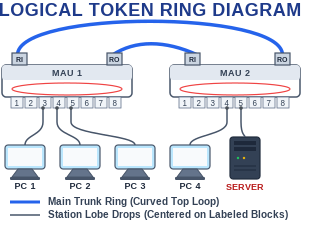
A token-ring network is physically implemented in a star configuration.
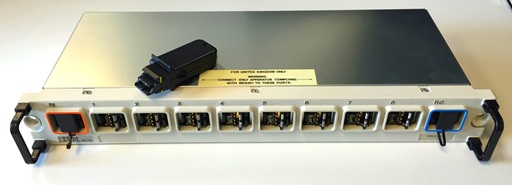
Each workstation was wired to a central hub, known as a Multi-station Access Unit (MAU). A typical MAU had 8 workstation ports and Ring-In (RI) and Ring-Out (RO) ports.
Multiple MAUs could be daisy-chained together to create rings with up to 255 workstations.
IBM 8228 Multistation Access Unit (MAU)
Token ring was named for a special type of packet known as the token. There was only one token allowed on the ring, and the only system allowed to transmit was the computer with the token. After a packet was sent & acknowledged by its recipient, the token was passed along to the next station in the ring.
This protocol did provide stability on a very busy network, but limited the throughput when the network wasn’t busy. If only one computer needed to send data, it still had to pass the token around between packets.
Physical layout
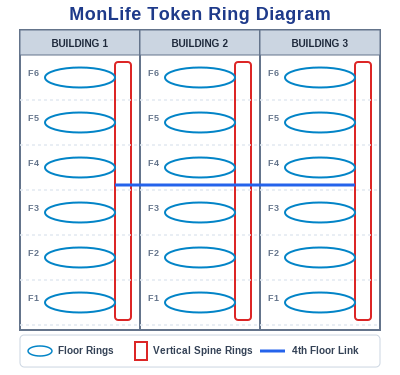
The complex occupied by MonLife was actually four separate buildings joined together, built over a span of about 40 years. (These buildings were commonly referred to as the “old”, “middle” (2 buildings), and “new”.)
Each building had its own vertical columns for wiring and infrastructure (stairwells, elevators, etc). As a result, we tended to think vertically about how to implement the network.
The computer room was on the 4th floor in the old building. All of the 3270 terminal cables were already run to the computer room, so it was also to be the central networking hub.
Logical layout
What we decided upon was a ring for each floor in each building, bridged to vertical rings connecting all the floors together. Those three rings were then connected to an extra ring in the computer room.
Bridging two Netware networks together required installing the bridge software on a PC having two network cards. This process was similar to building a server in that it was a fairly detailed process that was easy to mess up. Also, it meant that if you moved that computer to a different location, the software would need to be configured for it.
What I believe we ended up doing was creating diskettes with the software for every combination of networks being bridged. We then kept one diskette in the system being used as the bridge and one in the office as a spare. This also meant that we had to standardize the configuration of those bridges. Every bridge needed to have the same model cards configured the same way.
Problems
The most serious issue I remember was a recurring problem known as “beaconing”.
A problem would occur when there was a wiring issue somewhere. It could be caused by a loose connection, or a connector pulled, or a network card failing.
Regardless of the cause, workstations would start sending diagnostic packets continuously, trying to get the ring operational again. But since there was an electrical issue, the ring itself was corrupt - preventing all nodes from working.
In many cases, fixing this was an issue of trial & error.
Take a laptop to the wiring closet where the MAUs were and plug it in.
Run a network monitoring tool.
Unplug ports one at a time until the network stabilized.
Find the PC at the other end of the connection and try to diagnose it.
I don’t remember exactly how often this happened, it might have only been once a month or so. But when it happened, it disrupted the entire ring and was generally difficult to isolate.
Features
When PCs were first being deployed, IRMA cards were purchased to allow those computers to be used as 3270 terminals. (An IRMA card was an interface card that could be connected to an IBM mainframe through the same coax connection as a real 3270 terminal.)
Once the network was installed, an IBM terminal controller was also connected to the network. This allowed PCs to run 3270 emulation software without needing the IRMA cards. The individual PCs would connect through the Novell Gateway software, removing the need to configure each PC for a particular mainframe connection
Field Offices
The company decided to create a system for the field offices to give them access to current data for their customers.
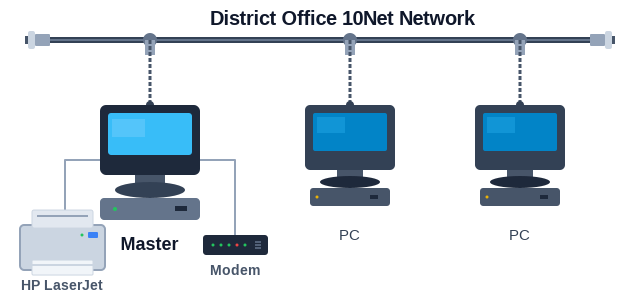
After some research, we selected the 10Net peer-to-peer network as the basis for those offices.
This used standard RG-58 coax cabling with the T connectors for each port and terminators on each end.
The cabling was run through the office with drops installed at the desks for the workstations.
Even though the network software was peer-to-peer, we were effectively setting them up in a client-server architecture.
Each office was going to get one “master” PC that would work like a server. It was a workstation for office staff to use, but it also served as the file server for the other PCs in the office.
The other workstations would run the applications, accessing the applications and the data from the server.
A set of applications were developed for the offices to be able to provide information and to enter certain transactions.
The software behind all this deserves a post of its own - coming up next.
]]>Ken WhitesellA technical career retrospective part 122026-10-08T00:00:00+00:002026-10-08T00:00:00+00:00https://kenwhitesell.github.io/2026/10/08/A-technical-career-retrospective-pt-12Why this post?
Many larger companies were slow adopting PCs at the corporate level. The terms “End-User Computing” (friendly term) or “feral systems” (unfriendly) were used to describe the growth of PC usage in companies outside of the traditional “Management Information” department.
Monumental Life was no different. The most “forward-thinking” departments were elsewhere in the building.
At some point, senior management realized that there should be some coordination among these deparments, and one of the needs was for some type of internal technical support that could provide assistance when needed. That’s when I got tapped on the shoulder…
TL;DR
PC usage at MonLife explodes, and I was one of the first to provide technical support at the company level.
“Technical Services, How may I help you?”
To be clear - I was nowhere near being expert in PCs at the time. (This was still during my peak Atari ST period.) Every department that had invested in PCs had at least two people with significantly more knowledge than I had.
Multiple departments had the Wang Word Processing system. One department had their own Arcnet network for file and print sharing. Some had Irma cards installed, allowing a PC to access the mainframe instead of the 3270 terminals.
Many different brands were purchased throughout different departments - usually based on whatever local vendor they contracted with. I remember encountering all of IBM, Compaq, HP, Dell, Toshiba and Gateway 2000 systems during those early years.
Our task was to support these as best we could. In most cases this involved configuring the systems, diagnosing problems, or answering operational questions. We would also get asked for hardware and software recommendations for specific purposes.
On more rare occasions, we needed to get involved with more custom programming to address specific needs within the company.
Memory
A recurring theme throughout most my time in those early years was memory and system configuration.
I started working with PCs with MS-DOS 3.3. The 640 KB limit was quite real at the time, and the 8088 CPU that MS-DOS was written for had no way to go beyond that.
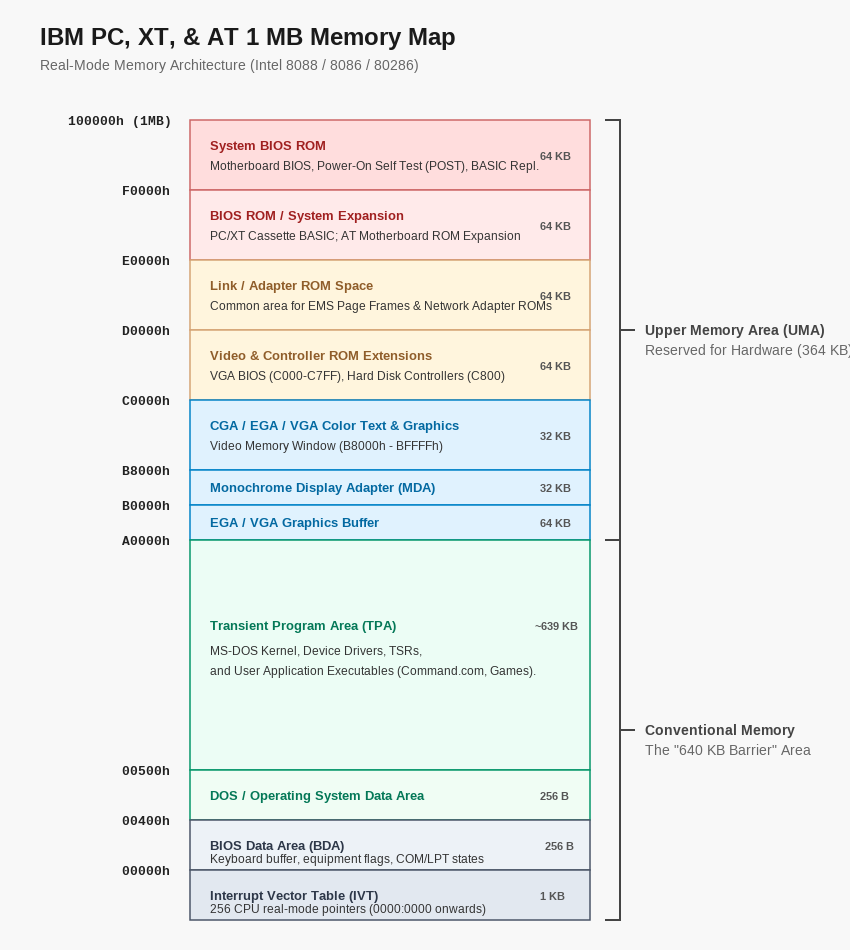
The 8088 could only address 1 MB of memory (20-bit address, or 1024 KB). When the IBM PC was being designed, the top 384 KB was reserved as three 128 KB blocks, one each for the BIOS and ROM, plug-in cards for the slots, and video memory mapping. That address space was known as the Upper Memory Area (UMA)
In 1985, a standard for “Expanded Memory” (EMS) was created, allowing for additional memory to be added to a system. This memory was accessible in 64 KB chunks, mapped to a portion of the UMA. This additional memory was used primarily for storing data, expecting that the code would always reside in the base 640 KB region. While custom code that carefully managed those pages allowed for code to be saved and run from that region, this was rare.
The 64KB frame being allocated had to align on a 16KB boundary within that upper memory. But it wasn’t always easy, as different cards - or even ROMs - tended to use arbitrary ranges in the UMA. Most decent cards had some degree of flexibility regarding their configuration. For example, both the original IBM Token Ring card and the Adaptec AHA-1542 SCSI disk controller needed space in the UMA for their ROMs and/or I/O transfer buffers.
Trying to make a number of different cards all work together was sometimes a bit of a jigsaw puzzle. It was necessary to know all the possibilities for each card, then find the combination making everything fit.
I/O Ports
It was also necessary to ensure that the I/O ports didn’t conflict, but this tended to be less of an issue. The original IBM PC and XT only used the lowest 10 address lines for those ports, providing 1,024 ports. Of that, 512 were reserved for the motherboard’s components and the other 512 for expansion cards.
Many of the ports used were standard or at least became de facto standards. For example, every serial port card allowed for ports being selected among the set 3f8, 2f8, 3e8, and 2e8 for COM1 - COM4 respectively. Specialty cards might provide options beyond that, but you could count on those ports being available options.
Conflicts tended to be rare, and only in those cases where a system needed more than one card of a given type installed.
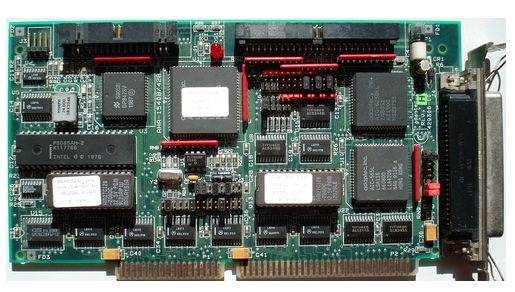
This was a SCSI disk controller
When the IBM AT was released, it opened up the full 16-bit I/O port addresses, allowing for 65,536 ports to be used. This should have eliminated any reasonable contention among the I/O ports for any given system. However, some cards were designed around the original 10-bit port address limitation, which meant they would also respond to any I/O requests where the port number has the same lower-order 10 bits. (e.g. A serial card listening to port 3f8 would also accept commands on 13f8, 23f8, and so on up to f3f8.)
IRQ lines
In addition to the I/O ports, many devices also needed to use an Interrupt Request (IRQ) line to signal the CPU when something needed to be done. There were 16 lines total, but most were used by standard devices such as the keyboard, disk controllers, serial and parallel ports. Once all the typical devices were configured, there would usually be only 3 or 4 IRQs available.
DMA Channels
Some interface cards could transfer data to/from the system memory directly, without the CPU needing to be involved. DMA channels were extremely limited, and typically reserved for situations where high-speed transfers were critical. (The Adaptec AHA-1542 SCSI disk controller being a notable example.)
An IBM PC or XT usually had one available DMA channel. The IBM AT and clones had 3 16-bit and 3 8-bit channels generally available. But, it would have been highly unusual to need more than these.
In a single-tasking operating system such as MS-DOS, the benefits were marginal. The advantages weren’t really seen until multi-tasking systems became common. An exception were the sound cards. A game could instruct a sound card to read sound data from memory directly, allowing the sound to be played without requiring CPU involvement.
System settings
Once a valid configuration has been identified, the cards would be configured - usually by either jumpers or switches. Then, the software drivers may need to be configured for programs to be able to use those devices.
There were no real standards for this. The settings could be in device drivers defined in config.sys or loaded by autoexec.bat.
Hard drive interfaces and capacities
Another area with a lot of growth and change were the hard drives.
The original IBM PC/XT and PC/AT systems were shipped with hard drives ranging from 5 MB to 20 MB using a connection and encoding known as MFM (Modified Frequency Modulation). The connection between the hard drive and the controller card was through two separate ribbon cables, and a third connection to the power supply. One of the two ribbon cables would have a second connector to attach a second hard drive, but use a separate cable for the second connection.
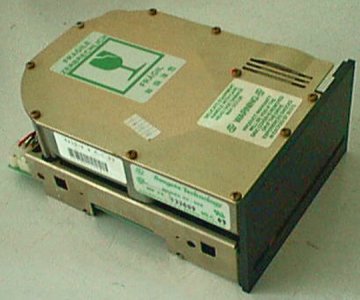
Early full-height 5 MB hard driveRoughly 3.5 inches high, 5.75 inches wide, 8 inches deep and weighing about 4.5 pounds.
The hard drives themselves were pretty much dumb devices. All necessary logic was in the controller card.
As a result, one of the requirements involved “parking” the read/write heads before powering off the computer. When the power was turned off, the heads would drop onto the track where they were currently located. Parking a drive would move the heads to a safe location, reducing the chances of a “head crash” - the heads landing on an area of the disk where data was stored, possibly damaging it at that location.
In the mid-80s, a second type of encoding was developed, known as RLL (Run Length Limited). This involved a change only in the controller card. An RLL controller could replace an MFM controller, connecting to the same drives. The RLL controller increased disk capacity by at least 50%, but not all drives were manufactured to the standards necessary to support it.
Drive manufacturers soon started identifying the drives that could handle RLL either by changing the model number or adding an “R” suffix to the model number, or both. For example, a very common drive at the time was the Seagate ST-251 40 MB drive. The RLL version was labelled as the ST-277R, and could store 65 MB. There was only about a 10% difference in price, so buying the newer RLL drives were much more economical.
In 1987, Seagate released the ST-251-1 as a faster and more reliable replacement for the ST-251. People soon discovered that it was also a more reliable drive on an RLL controller than the designed-for-RLL ST-277R!
When the IBM PS/2 was first released in 1977, they used MFM drives. But by the time I started working with them in 1988, they were using an IBM-proprietary interface called “Enhanced Small Disk Interface” (ESDI). The PS/2 was the only series of PCs that I knew that ever used them. They were good drives - I never saw any real problem with them, but they were expensive to replace or upgrade.
Small Computer System Interface (SCSI)
The final type of hard drive I worked with were those using the Small Computer System Interface (SCSI). These drives were unique at the time in that each drive had a controller on the drive, and could process requests independent of the controller.
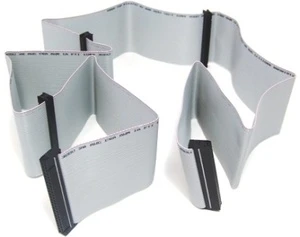
Ribbon cable with connectors for 4 devices
An original (SCSI-1) controller could have up to 7 drives attached. Internally, the drives would be connected by a multi-connector ribbon cable. External drives typically had two connectors, allowing multiple drives to be chained together.
A controller could issue a command to one drive, then “disconnect” from the drive to issue a command to a different drive. Each drive could then transmit data back to the system when the operation was complete. Each drive would control the bus only during those times when it was transferring data on the bus.
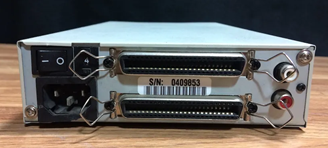
Back view of a SCSI CD-ROM drive
This ability to interleave operations among devices was a significant performance benefit in a multi-tasking environment - which MS-DOS was most certainly not. However, even in a single-tasking environment, the data transfer rates on a SCSI-based system was faster than the other interfaces. The more “performance constrained” departments found it worthwhile to invest in SCSI equipment for their computers.
But, what made SCSI so impressive at the time was that it was usable by devices other than hard drives. It was truly a general bus for multiple device types. There were RAID enclosures that could be connected, where the RAID controller was a single device from the perspective of the host controller. Tape drives and CD-ROM were commonly available with SCSI interfaces. There were even high-end scanners and printers using it. In essence, it was the parallel interface version of the yet-to-be-invented USB port.
Side note: SCSI was the standard interface for the Macs in the late ’80s through the ’90s, but I wasn’t aware of that fact at the time.
The IBM PS/2
In 1984, IBM had more than 60% of the PC market. By 1987, that had dropped below 40% as numerous companies began selling fully-compatible systems for significantly lower cost. To try and take control back, they introduced the PS/2 line of computers with a new bus known as the Micro Channel Architecture (MCA).
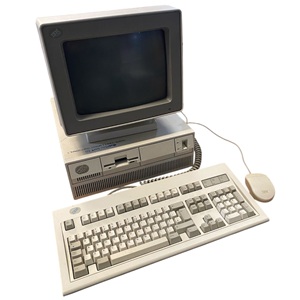
IBM PS/2 model 50
The MCA had significant advantages over the original ISA (“Industry Standard Architecture”) bus, both in transfer rates, data width, bus control and configuration.
Every card could be configured via software - there was no need for the jumpers and DIP switches to set things like I/O ports or IRQ settings. Everything was done automatically by software, with the system determining what the allocation would be for I/O ports, IRQ lines, and UMA addresses, writing the configuration in its bios settings.
Another technology advancement of the PS/2 was that it integrated the VGA video controller on the motherboard, providing a native 640x480 16-color graphics mode without an extra video card.
It was also the PS/2 that brought the 3.5-inch 1.44 MB floppy disk drive to the PC market, quickly making the 5.25-inch 360 KB floppy obsolete - even on ISA-based systems.
There were three major downsides to the MCA.
First, it was a completely proprietary bus. Card manufactures had to pay patent license fees to IBM to be able to make and sell micro-channel cards.
Also, as a new bus, it was completely incompatible with the ISA bus. This meant that replacing an ISA system with an MCA system involved replacing all cards you might be using as well.
Finally, the built-in VGA turned out to be a hindrance, as the clone market started selling video cards capable of displaying 800x600 less than a year after the introduction of the PS/2, and could display 1024x768 the year after that.
The PS/2 was a fine system, but the costs and limitations pretty much limited them to corporate environments. I don’t know anyone who purchased a PS/2 for personal (non-business or non-company) use.
]]>Ken WhitesellA technical career retrospective part 112026-09-30T00:00:00+00:002026-09-30T00:00:00+00:00https://kenwhitesell.github.io/2026/09/30/A-technical-career-retrospective-pt-11Why this post?
IBM DB/2 was new to Monumental Life (MonLife) in 1986. There was a major effort to modernize a number of applications to take advantage of the technology. This led to a lot of work in a number of different areas. I had never worked with a relational database before - but then neither had most of the other programmers there.
During this period, there were other architectural changes in the environment that I skipped in the previous post.
TL;DR
DB/2, CICS, and 31-bit addressing round out my MVS education as a mainframe application developer.
DB/2
Introduced to relational databases
One of the applications selected for migration to DB/2 was the system I was working on. I was selected to be part of the team responsible for designing the databases.
The first part of this project was learning about the Normal Forms for managing data in a relational database. While there were 7 recognized forms at the time, only the first 3 were considered important enough to us to enforce.
Note: IBM originally named their query language "SEQUEL" (Structured English Query Language), but renamed it to "SQL" (Structured Query Language) due to a trademark conflict.
After going through the training, I was selected to participate in the design of the database tables for the system I was supporting. We met as a group, offsite, for a full week to work through the process of looking at our file structures and mapping them to a set of database tables.
While I don’t remember any of the specifics of the files or tables, I do remember the process and the nature of the discussions. It’s a general process that I’ve used since then when designing databases, and has always produced acceptable results.
Using DB/2 with COBOL on MVS
Extra steps were required to use DB/2 in a COBOL program. Elements like SQL statements and cursors weren’t a part of the language, and so making them available within COBOL had to be done outside the traditional compilation proccess.
Variables had to be defined in your program for every column being retrieved in a query. IBM provided a tool, dclgen, that would generate a COBOL structure for a table or view. That code would then be placed in a “copybook” to be included in programs accessing that table. (Effectively the same as the C #include statement)
In the program, SQL statements would be enclosed between EXEC SQL and END EXEC statements. A DB2 preprocessor would be run to convert that block to a standard COBOL CALL statement, It would also create a separate Database Request Module (DBRM) containing the actual SQL statements. The output from the preprocessor would then be compiled and linked to create a standard executable program.
The DBRM was used in a separate “Bind” step. During the bind, the SQL would be verified both for syntax of the SQL itself along with verifying that the tables, columns, and referenced data types are all correct. It also verify that the account running the bind has the appropriate privileges to execute those SQL statements.
Finally, the query optimizer would create the access plan to determine how DB2 would perform the actual query. This query plan would be used when the query was being executed, preventing any need for the planner to be run when the program is being run.
This separate bind step created some extra work managing the production environment, but also provided a clear separation of duties between the programmers and the operations / database administrators.
From the programmer’s perspective, it didn’t really affect much. The complete compile, link, and bind process in development didn’t take significantly more time, and didn’t produce that much more output needing to be checked.
Using DB/2 interactively
There were two different ways to access DB/2 interactively.
The “standard” tool was the SQL Processor Using File Input (SPUFI). As a terminal-based tool, it displayed an edit page for a dataset or PDS member. The SQL statement would be entered. When the editor was exited, the file was saved and passed to the DB2/2 processor. It would then open the output file in browse mode to review the results.
It was common to create a PDS containing a large number of different queries that could be run quickly. There was an option within SPUFI to run a query without editing it first, providing the ability to create a library of frequently-used queries.
There was a separate tool named QMF (Query Management Facility) designed more as an end-user tool. It was more of a “report-building” tool focused on directly creating reports with formatted output like control and page breaks, headers, and footers. It also provided its own storage facility for running and saving queries.
Other topics
CICS
As a developer or other “general purpose” user, the typical means of using the mainframe interactively was logging on to TSO (Time Sharing Option). However, this doesn’t scale well in a production environment because each TSO session is a unique process, with its own memory allocation. It would be wasteful to purchase a mainframe large enough to support hundreds of TSO users who are only using the system for data entry.
IBM had a product called the Customer Information Control System (CICS) which served as a monitor program for other modules. Those modules, known as transactions, would run within CICS. Users would all connect to one CICS instance to run their transactions. This avoids the overhead of individual processes being started for each connection, and reduces the memory requirements of having 100 people all using the same program.
In general, a transaction would display data, and optionally define fields for data entry. When the screen was submitted, the transaction would validate the input, usually save the data, and display a new screen.
About 10 years later I would see the parallels between this, the then-new http protocol, and the web servers being developed to support it.
Memory addressing
The evolution of the IBM OS/360 series of operating systems is an interesting study in itself, but a topic I’m not going to discuss here. (I find it amazing that code written and compiled 60 years ago for the very first IBM OS/360 might still be able to run natively in z/OS today. That’s an incredible testament to the flexibility of the architecture.)
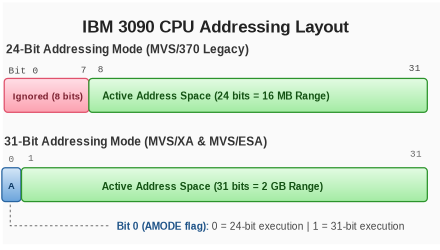
One early architectural limitation of the CPUs in those systems was that addresses were 24 bits in length, limiting addressibility to 16 MB. (Keep in mind that the very first releases of OS/360 was designed to run in systems with as little as 128 KB of memory, but generally up to 1 MB.)
As the systems continued to grow and evolve, that 16 MB address limit became a problem.
MVS introduced the ability for each process to have a separate 16 MB address space. The physical system could have more than that, but each process could only reference 16 MB. That 16 MB boundary became known as “the line”.
As software and data requirements grew, this became a more significant issue. In 1983, IBM released hardware and software upgrades that allowed for 31-bit addresses, expanding the addressible memory to 2 GB. Code using 31-bit addresses internally was said to be able to run “above the line”.
Why a 31-bit address instead of a 32-bit address? IBM decided that the easiest way to maintain compatibility with older software was to use that first bit as a flag to indicate the type of address being used. If a process is running in 31-bit mode and bit 0 == 0, then the address is a 24-bit address and the other 7 bits of that byte would be ignored. If bit 0 == 1, then the address is a 31-bit address, and the other 7 bits of that byte are part of the address.
But why was it necessary to ignore that first byte? Again, it’s a historical artifact from back when memory was extremely tight. Developers learned to use that first address byte for other purposes. It was not uncommon to use them for internal status indicators within the code. In those situations, that first byte would not necessarily be 0, creating an error if those bits were used as part of the address.
In the mid-80s it was necessary to manage software modules using a combination of 24 and 31 bit modes. It was possible to modify code that could only run below the line access data that was above the line. As long as those modules didn’t use those high-order bits for other purposes, that was one of the easiest changes to make, and moving I/O buffers above the line was a quick win in a number of situations.
But when you’re linking modules together, they had to agree on the addressing mode being used. If a module using memory above the line is linked to a module not using it, then that other module may be unable to access data allocated by the first.
My recollection is that it wasn’t much of a problem for the team I was on. I don’t recall any of the programs that I worked on needing to use 31-bit addresses.
Moving on
In February 1988, I was transferred from the programming department to the systems shop. I was expecting to start assuming some responsibilities over the maintenance and configuration of the mainframe. But the rapid growth and adoption of PCs in the company was soon to move my career in yet another direction - but that’s a story for later posts.
]]>Ken WhitesellA technical career retrospective part 102026-09-23T00:00:00+00:002026-09-23T00:00:00+00:00https://kenwhitesell.github.io/2026/09/23/A-technical-career-retrospective-pt-10Why this post?
I was hired by the Monumental Life Insurance Company in June 1986 in their programming department. My first exposure to a real batch-oriented production system environment!
I covered some MVS fundamentals back in part 7 from a user-facing perspective.
The management of datasets in MVS was unique to me. I have never worked on any other platform that required so much specific technical knowledge when working with data being stored on hard drives. Every other system I’ve used had completely abstracted away the physical geometry, making it invisible to the application developer.
TL;DR
I learned a lot more about MVS this time around, giving me an even deeper understanding of the mainframe environment.
Disclaimer
IBM z/OS is still currently a very active system. It has also made tremendous advancements in the past 40+ years. A lot of what I describe here may have been true in 1986 but isn’t true anymore. Don’t take what I say about “MVS - then” to be relevent when talking about “z/OS - today”.
Overview
My job revolved around one small part of the large system that effectively ran the company. During the day, people working in various departments would enter data. At night, that data would be processed as updates and applied to the master files. Various reports and extracts would be created. Reports and extracts would be created from them. Reports would be printed and distributed.
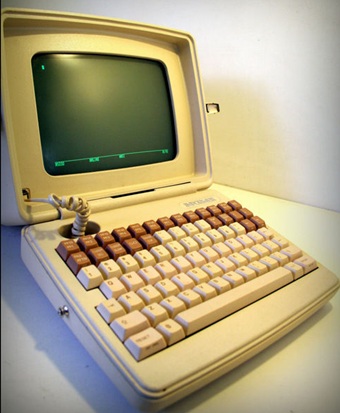
Informer closed for transportThis unit weighed 16 lbs (~ 7.2 kg)
At times, and for various reasons, the programs running at night would crash and need to be fixed that same night.
The nature of the fixes would vary. In some cases, a dataset couldn’t be allocated or ran out of space. In some cases, the update was flawed and would be removed. In others, a program might need to be fixed.
In either case, it was considered urgent and the work needed to be done for the nightly cycle to complete on time.
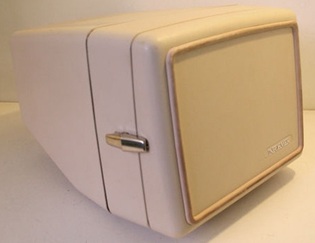
Informer opened and ready to useAn 80 x 24 display on 12" monitor.
Being “on call” for a day, or week, was considered normal and expected. You got used to getting calls at 2 AM letting you know about a problem - and then waking up enough to take care of them. That was just part of being a mainframe programmer in the 70’s and 80’s.
Due to the full-screen nature of the IBM 3270 terminals, a special terminal was needed for remote connectivity. We used the Informer brand of terminals. Anyone being On Call would sign one out to take home.
Because of my on-line activities at that time, I already had a second phone line available to me. I was one of the few people who could log on and research a problem and still be on the phone with either the operators or co-workers.
One non-programming factor in ensuring a successful nightly cycle is managing DASD and datasets. I spent a lot of time gaining an understanding of the datasets being used at different parts of the cycle.
DASD allocation
Block size
The first truly eye-opening issue I learned was the importance of calculating block sizes for datasets. The IBM system did not use a standard or fixed block size on disks or tape. A track on a 3380 DASD unit could hold 47,476 bytes.
This was quite a conceptual change from the Apple using a 256 byte sector size, the Honeywell and its 64 word sectors, and the MS-DOS/Atari ST diskette 512 byte sectors.
The maximum standard block size for most MVS software was 32,760 bytes. But if a dataset was created with that block size there would only be one block per track, wasting roughly 30% of the allocated space.
Each block on a track also incurrs some degree of overhead for the physical gap between the blocks and the block headers.
Performance is also affected by the number of I/O requests needed to read any given amount of data. Each I/O request creates a sizeable amount of overhead for the OS to schedule and execute that request. That overhead was significantly longer than the time required for the disk to spin past the start of the next block, requiring the controller to wait a full rotation before being able to read that next block.
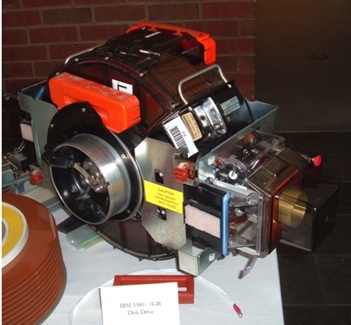
The guts of an IBM 3380 DASD unit1.2 GB of storage on nine 14" platters
A dataset having 60 80-byte blocks on a track requires the disk complete 60 rotations for the data to be read, which is one full second of time. If those 80-byte blocks are read as one 4800-byte, that entire block is read as one I/O operation in one rotation of the disk, making it 60-times faster.
The general key to optimizing performance and space utilization was to find the largest block size that was a multiple of the block size less than half the usable track size, which worked out to 23,476 bytes. (That’s less than half of 47,476 because of the additional overhead of the second block on the track.)
For example, with 80-byte records, a 23,440 byte block holds 293 records and two blocks use more than 98% of the disk track capacity. If that is reduced to an 80-byte block, only 411 blocks will fit on a track using just 32,880 bytes. This uses less than 70% of the space on the disk.
These differences are more significant with magnetic tape. In the early 80’s, the common tape reel was 2,400 feet long using a density of 6,250 bits per inch (BPI). A tape using a 32,400 byte block size could contain about 170 MB. If the tape is written with 80-byte blocks, the tape would hold less than 3.5 MB. The gap between blocks is actually 25 times as long as the data block itself. (The standard gap for 6250 BPI tape drives is 0.3 inches, less than half the gap of the old 1600 BPI standard.)
Space allocation
Another performance factor with datasets is that they were allocated in contiguous space as much as possible.
Space allocation on MVS was measured in terms of tracks or cylinders. Each track on an IBM 3380 DASD unit was 47,476 bytes. How that track was divided into blocks was up to the developer.
The allocation is defined as two numbers, a primary allocation and a secondary.
If a dataset was configured to use 10 cylinders as the primary, MVS would attempt to find 10 free contiguous cylinders. This would minimize the amount of head movement needed to read or write that dataset.
If there weren’t 10 contiguous free cylinders, MVS would try to find up to 5 non-contiguous chunks to satisfy the allocation. (These chunks are known as extents.)
The secondary value is the amount to add if the dataset grows beyond its current size.
Each additional allocation is another extent.
The fewer the number of extents, the fewer the number of times the heads had to move to a non-adjacent cylinder. Moving to an adjacent cylinder was about 3 ms. An average non-adjacent move took 5 times as long, so there was a definite benefit to reducing the amount of head movement necessary.
A dataset may not have more than 16 extents total. Tracking the number of extents used by a dataset and its rate of growth was an important part of managing your datasets.
MVS also allowed specifying the number of blocks to allocate, allowing it to calculate the amount of space needed. This was preferred in some areas having different model DASD units to avoid making the JCL dependent upon a specific unit. (This was not something we typically did. Our internal conventions were to allocate in terms of tracks or cylinders.)
Volume allocation
Finally, when working on a DASD-intensive process, it was important to spread the datasets around to not create a bottleneck on a particular volume. If a process is reading both a master file and a set of updates and creating a new instance of the master file, the process would usually run much more quickly if those three datasets were on different volumes.
If there’s a lot of batch processing occurring overnight, it could be critical to coordinate work being performed by those different processes to reduce conflicts regarding DASD volume utilization. Situations where different batch jobs are both heavily relying on the same volume at the same time should also be avoided.
In 1986 this didn’t seem to be an issue for us. My training emphasized how important this could be, but I don’t remember any situation where I had to pay particular attention to it. I’m guessing that resources had expanded to the point to where it wasn’t necessary to specify a volume. In most cases, it was acceptable to let MVS choose a volume for a dataset.
Dataset organization
Processing sequential files was the only way of managing data when the only common mass-storage media were punch cards and magnetic tape.
The DASD units provided the ability to access data randomly. Information could be read or updated without reading an entire file. This improved performance for processes that only needed to update a small percentage of the data.
Before databases became popular, there were two different types of files typically used to take advantage of this. The first was known as the Relative Record Data Set (RRDS). This only worked with fixed-sized records, but allowed the programmer to directly access any record based upon its record number.
The other, more intricate organization was the Key Sequenced Data Set (KSDS). A KSDS consisted of both a data cluster and an index cluster. The records were defined with some part of that record being the unique primary key. The index cluster maps that primary key to the location of that record within the data cluster.
This provided the ability to either read the file sequentially or by retrieving a record based upon its key. Records could also be inserted at any location, provided the key provided was unique.
A common technique was to identify the primary key but add a suffix to it to allow for future expansion. The precise semantics of that suffix could vary based upon need. It could be a record type or a sequential number - or even be a combination of the two.
It was also common to mix the two reference types. A program could randomly retrieve the first record for a primary key, and then read sequentially through the set of records to process all the different suffixes that exist on the base key.
It was also possible to define alternate indexes (AIX). Those indexes were not required to be unique. For example, it was possible to create an AIX on zip code if it were necessary to organize your processes based upon it.
Monitoring KSDS performance was an ongoing requirement. There was a lot of internal space management necessary on active datasets that I’ve glossed over. Highly active datasets would need to be reorganized periodically to keep performance at acceptable levels.
Application programmer’s perspective
These details weren’t important to the COBOL code written to process those datasets. That was an important feature of the MVS operating system. The code would be the same regardless of the block size.
Where this mattered was in the construction of the JCL used to manage the job and the datasets being used.
Programming languages used
COBOL
A lot has been written about COBOL, some of it is even accurate.
Yes, it’s verbose.
Yes, a lot of what we consider important in a language wasn’t available in 1970.
No, it wasn’t really well-suited for interactive applications - even though there were extensions available to make it work in that environment.
COBOL is frequently looked down-upon for a number of mostly-valid reasons. I won’t deny that it can be a frustrating language to deal with under a variety of circumstances. But it also had some very powerful features:
Intrinisic support for numbers being stored in multiple format. It didn’t matter if a number was stored as a sequence of characters (1 digit per byte), packed decimal (2 digits per byte), binary integer (2, 4 or 8 bytes), or floating point (4 or 8 bytes). The same operations could be performed on all of them.
A hierarchical structured data definition. Data elements are generally grouped into a higher level structure. Cobol allows most operations to be performed on either an individual field or group.
Move corresponding. A program could move a set of elements from a source to a destination based upon the names of those elements. This was particularly useful for reorganizing data fields when creating reports.
Easy formatting of output fields. Features like floating dollar signs or asterisks, numeric comma delimiters, and character insertion are all intrinsic parts of the language.
Array bounds checking. A compiler option was available to force array indexes to be checked to ensure the memory reference was within the bounds of the table being accessed.
Dylakor
We had another language available to us called Dylakor. This was an interpreted language that was ideal for quickly producing reports. It used a greatly-simplified syntax for describing data formats, and had the advantage that a complete record did not need to be defined. If only three fields from a large record were needed, the record definition would only contain those three fields by identifying their offset from the beginning of the record.
It was primarily designed as a “Report Writing” language. It was primarily built around an implicit processing loop. In the simplest case, the entire script would be run once for each record in the input dataset.
Filters could be added to limit the processing to specific record. An implicit sort could be added to change the order in which records were processed.
Control breaks (subtotals and line spacing or page breaks) could be defined based upon the value of a specific field changing from one record to the next.
Page headers and footers could be easily defined.
Most importantly, it wasn’t limited to that style of processing. A program could be written to have full control over the sequence of processing and the output being generated. It had very powerful features for working with DB2 and datasets of all kinds.
It quickly became my “Swiss army knife” for data conversions and transformations. Had I been working with it 20 years later, I would have called it “Python for MVS” - not so much for the syntax, but for the “Batteries included” nature of what could be done with it.
]]>Ken WhitesellA technical career retrospective part 92026-09-15T00:00:00+00:002026-09-15T00:00:00+00:00https://kenwhitesell.github.io/2026/09/15/A-technical-career-retrospective-pt-9Why this post?
My hobby takes a more “business-oriented” turn. My focus changes from general research, entertainment and mathematics to more “data-oriented” uses.
TL;DR
I enter the 32-bit world at home.
Background
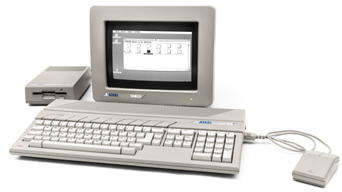
In January 1985, Atari announced their Atari 520ST. A 512K 68000-based system with an external floppy drive and a 640x400 monochrome monitor for $800, or about a quarter of the price of a comparable Mac.
This was going to be the first time for me to join the “leading edge” of a computer platform.
First impressions
Wow! I’m now one of the first people in my area to own one. There’s 512K of memory, 360K diskettes. An actual monitor - not something I’m hooking up to a TV.
Along with that, my copy of the developer’s kit arrived. It consisted of 5(?) diskettes and about 1500 3-hole punch pages of documentation.
Buy some binders, organize the docs, start browsing.
Power up.
Wait.
What? The OS isn’t in ROM?
I need to boot the OS from diskette? OK, ROMs aren’t ready yet.
How much space does it need? 200K +? Ok, that still leaves me with 300K usable.
Well no, any desktop accessories being loaded consumed memory. The screen itself uses 32K.
In practice, a usable system had about 225K of free memory. Still a considerable amount, but no longer enough to store an entire diskette in memory.
At least the boot disk could be removed once it had loaded. Everything was in memory, so there was no need to keep the disk in the drive.
Why does this matter?
The first thing to do was make backups of the diskettes - especially the boot disks. Without a boot disk, the system was useless.
Copying disks was a tedious process - it took about 5 minutes to duplicate a 360K diskette with only one drive, because the disks needed to be swapped multiple times. And my experiences with floppy diskettes was such that I was never satisfied with only one backup copy. I made two backup copies of every important disk (the developer’s kit) and three of critical disks (the boot and language disks).
The 3.5” diskettes at the time were about $50 (retail) for a box of 10. Two boxes for backups was another $100.
I realized quickly that having one drive was going to be too much of a bottleneck. (I should have remembered that from my early Apple 2 experience.) There went another $200 for a second drive.
Getting started
Compiling a program using the development kit was tedious. The C compiler was a 3-pass compiler, assembler and a linker, which meant five separate programs were run for any single-file program.
Having a program divided into smaller modules was worse. The three compiler steps and assembler had to be run for each module, and then the compiled modules had to be linked together to make the program file.
There was no shell. No command-line facility at all. There was a program (batch.ttp) that would run a sequence of other programs. Those batch files were only a list of programs to run. There was no iteration, conditionals, or other “script-like” facilities. It was so limited that it was unable to run a separate instance of itself. (A .bat file could not run batch.ttp.)
There was no “make” facility. If a program consisted of 5 separate source files, the batch file to build it would run the full compile set for all 5 before linking them together.
With all the files on diskettes, there was a lot of head movement between the compiler steps, reading the source and header files, and writing the intermediate files. Once past the “toy program” phase, compiling a source file required at least 5 minutes. If a program was divided into multiple separate source modules, a full build could take more than an hour.
After less than a month, I gave up. There was no way I was going to be able to create anything of substance in this environment.
Don’t misunderstand, I was still quite happy with the ST. The supplied word processor (ST Writer) and terminal program (VT-52 Emulator) allowed me to get a lot of personal value from my purchase. And, I knew that once the TOS ROMs were shipped, I would have a couple of different ways that performance would be improved.
Everything changes for the better in 1986
By July 1986, one year later, many things had changed for the better.
On the personal side, I was discharged from the Air Force in December 1985. My first civilian programming job paid almost twice the pay that I was getting in the military. (I went from about $14,000 per year to $26,500.) That greatly eased my budgetary constraints.
The Atari TOS ROMs were available and I had them installed. (That immediately doubled the amount of usable memory in the system.)
The new TOS ROMs supported the new double-sided diskettes, increasing disk capacity from 360K to 720K. And, they were effectively faster in that twice as much data could be read or written before needing to move the heads. So I replaced one of my drives with a double-sided drive.
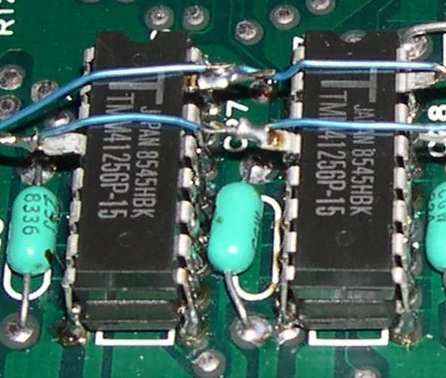
It was discovered that an Atari 520 ST could be upgraded from 512K to 1 MB by piggy-backing a second set of memory chips to the top of the existing set.
Piggyback memory upgrade - 2 of 16 chips
The new chips would be soldered directly on top of the existing chips.
They would use the same electrical signals as the chips below them, except for the two address lines that had to be connected to the memory controller.
This seemed a bit “iffy” to me at first, but once I talked to two other people who had it done - and were quite happy with the results - I went ahead with it.
One of the real advantages of the memory upgrade is that it allowed me to create a 360KB RAM Disk. The compilers, assembler, linker and system libraries would all be able to fit on it - greatly increasing the speed.
Everything else that was needed fit on one diskette. A complete compilation process could be done without switching diskettes.
What used to be a 25-30 minute process would frequently be done in a couple of minutes.
But the irony here is that other software was being published that eliminated my needs for doing much C-language programming for myself.
Commercial quality software was becoming available. VIP Professional was the first really serious spreadsheet, and dBMAN was an excellent database system. 1st Word was bundled with early STs, making it the default word processor in many areas. Finally, Flash, a fully-scriptable terminal program was released.
I could now do the real things I wanted to do without having to write a lot of custom code for it.
This configuration served me well for about a year and a half. The material I was producing was either being sent electronically or printed on my dot-matrix printer.
A massive upgrade in 1988
In late ‘87 / early ‘88, I bought an Atari Mega ST 4, which was the 4 MB version of the ST. I also bought the Atari SLM804 Laser printer, the desktop publishing program Calamus, and a 100MB hard drive. There were also some greatly improved development tools available, include a couple of command-line shells and utilities that brought Unix-style scripting to the ST.
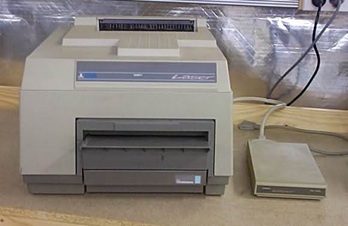
The SLM804 was unique - it didn’t have any processor or memory in the printer. Everything was driven and controlled by the Mega ST. The software would allocate a full megabyte of memory to build the page image as a bit map in the computer’s memory. The computer would then run a very tight loop to send data at the rate the printer could accept. (It was otherwise unusable while pages were being printed.)
This design greatly reduced the printer’s cost, being sold “bare” (no software) for about $1500. A bundle including some fonts and other software sold for less than $2000. Meanwhile, the HP LaserJet II cost about $2500.
From my perspective, this gave me a near-professional setup.
At one point in time, I had a script set up to help me run a Fantasy Baseball League:
Dial in to an online service (Computer Sports World) to retrieve data (Flash).
Process the data, generating report segments as text files (dBMAN).
Create a “text page” version of the report (shell script).
Sending the text report through email (Flash).
Create a newsletter style layout of the output, suitable for printing (Calamus).
I would run that, add whatever commentary information desired, and print the 10 - 15 copies on the laser printer.
STacy
Atari STacy 4
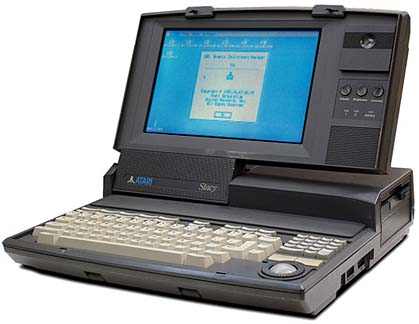
Early in 1990, I bought a STacy 4. It was an Atari laptop with 4 GB RAM and an internal 40 GB hard drive. The original system was intended to be run on 12(!) standard C-cell batteries, but that only provided about 15 minutes of use.
A friend of mine helped develop a ni-cad battery pack that was built into a laptop case. The base of the case was a complete layer of batteries, giving somewhere between 6 and 8 hours of operating time.
The case, batteries, and other electronics brought the total weight to about 25 pounds.In practice, this made it more of a “transportable” computer than a real laptop, but it was still more convenient to take on the road than a full ST system.
Sunset
That was an incredible 3 years for me, but the writing was on the wall. The rapid growth and development in the IBM compatible world, especially with the release of Windows 3.0 for the 80386, made me realize there wasn’t a long-term future in the platform.
A much younger me
It wasn’t just CPU speed or memory capacity causing me to become dissatified.
Video resolutions were better - standard VGA at 640x480 at 16 colors was visually superior to anything the ST could do. But by 1991, the high-end standard was XGA (1024x768 at 256 colors), combined with 14” to 19” monitors. (These were configurations I was using in my day job, and the ST just didn’t stand up to the comparison.)
Software selection was definitely better. Productivity tools for the ST just didn’t feel as “polished” or as powerful as their DOS/Windows counterparts, and since I worked in a Windows-based environment, file and data compatibility became an issue as well.
I was also missing the ability to expand the system using plug-in cards in slots. Networking multiple computers to share resources became more important.
So in 1991, I put together a 33 MHz 80486 system with 16 MB RAM and another 100 MB hard drive. This pushed the ST into a secondary / supporting role. (I was still using it for publishing, but all the real work was being done on the ‘486.)
Somewhere mid to late 1992, I sold off whatever Atari ST gear I had left at whatever price I could get for it.
The hardest part for me was separating myself from the Atari community in the Washington DC area. This was my first significant involvement with a user group. After six years, the friendships and associations were important to me. Giving that up was inevitable, but the hardest part of that decision.
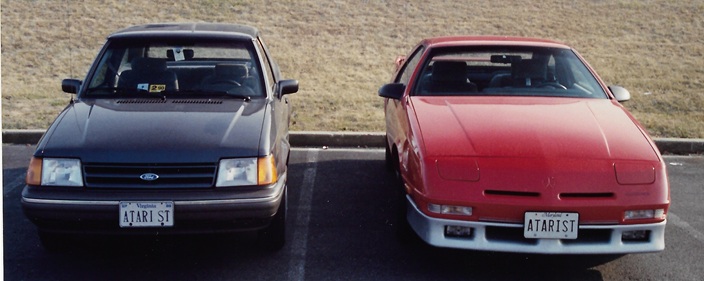
A friend of mine from NOVATARI and I decided to show our love of the platform.The red Dodge Daytona on the right was mine.]]>Ken WhitesellA technical career retrospective part 82026-08-25T00:00:00+00:002026-08-25T00:00:00+00:00https://kenwhitesell.github.io/2026/08/25/A-technical-career-retrospective-pt-8Why this post?
I’ve spend a lot of time so far providing a lot of technical detail about specific systems. But there’s another aspect to this that doesn’t fit quite so cleanly into one of these categories, and that’s the growth of communications among the hobbyists.
(Right now I’m sitting at the DjangoCon US registration desk. It seems like the timing is perfect for this post. It’s impossible for me to over-state how valuable the various user-communities have been for me through the years.)
tl;dr
“None of us is as smart as all of us.” - Ken Blanchard
Background
Getting timely and accurate information about home computer was frequently difficult and sometimes frustrating. It was not uncommon to encounter a situation that could not be resolved by the information at hand.
So as much out of necessity as for any other reason, people would find others with the same equipment to share information and knowledge. But even geography could be an issue for products having a limited user base is more remote areas.
I was effectively a member of a “Users Group” when I started with the HP-2000F, even though we didn’t consider ourselves one. There would be conversations among the regulars hanging around the computer lab, either talking about projects or general tips and techniques.
The school district IT center also published a periodic newsletter with puzzles, projects ideas, and other useful information.
After that, I was isolated for a while. When I first got my Apple, my only source of continuing information were magazines and newsletters.
Magazines
At any point of time, I was probably subscribed to at least 6 different magazines, and would generally buy one or two others at newstands.
Those magazines were a life-line. Seeing what other people were doing opened my eyes to a range of possibilities I wouldn’t have otherwise known existed.
New products were an important part of it. Both the ads and reviews were helpful when trying to decide what to buy.
(I grew very wary of trusting the computer stores. They either didn’t know what they were selling, or were more interested in making the sale instead of providing useful information to their customers.)
The Internet Archive has a growing collection of classic magazines. I would particularly recommend browsing through an old issue of Computer Shopper (such as the July 1984 issue) to get a taste of what costs were like at the time.
A dollar in 1984 is worth about $3.20 today, so multiply every price you see by 3.2 to get an idea of what the effective price was at the time. For example, multiple companies were advertising 1200 baud modems for around $470. That translates to $1500 today, for the ability to send and receive data at 120 characters / second. (120 CPS means that it would take about 2.5 hours to transmit 1 MB.)
I had saved pretty much every issue of every magazine I bought over a 15 year period. There were probably 4 to 6 magazines where I had complete collections and an equal number that were mostly complete. When we were preparing to move in 1998, I realized I couldn’t keep them and so disposed of them all. (It was somewhere in the neighborhood of 20 - 25 paper boxes.) I hated having to do it, but I didn’t know whether I was going to have room to store them.
Limits
The magazines were great. But, there was no interactivity. If you had a question, there wasn’t really a way to get a timely answer.
I had known of services like Compuserve and The Source in 1981, but neither one had local access points. Connecting to them would have been long-distance calls in addition to the per-minute connection fees charged.
Private Bulletin Board Systems (BBS) were starting to become available as well, but there weren’t any really easy ways to find out about them.
Moving North
In the spring of 1983 I was reassigned to Washington DC. That summer I bought an Atari 800. (It was an amazing computer for developing and playing games. But since I never did any serious development on it, it doesn’t deserve a full write-up here.)
But the most significant change for me was the exposure to the local user group communities. Washington had very active groups for both the Apple and Atari systems. That also gave me sources for finding local BBSs.
User Groups
In the pre-internet days, the User Groups were the best sources for sharing information. Different groups would organize themselves in different ways, with different focuses.
The Washington area was filled with a number of different active groups.
Some were focused on areas such as business applications, gaming, software development or even hardware mods and add-ons. There were other groups that would be more general. Some larger groups would form special-interest subgroups. But you could almost always find some group sharing information on your particular area of interest.
Shareware
Prior to the growth of the Open Source movement, individuals could distribute their software as “Shareware”. A Shareware product was freely distributable, but frequently a limited version of a more full-featured product. By sending a payment to the author, you would usually receive something like a “Registration Code” that would unlock the rest of the program.
A sample shareware disk
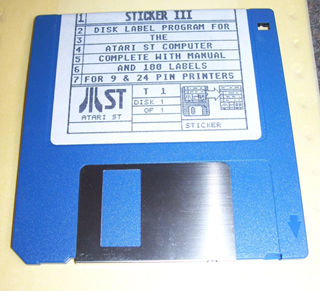
Many user groups would put together collections of shareware and free software on disks, and sell them to the group members as a means of raising money for the group. The unregistered versions would be distributed - the people buying the disks would still be expected to register the software they’re using.
These disks were pretty much the only way a lot people would have access to that software. Download sites were still fairly rare, and time consuming to download anything of reasonable size. A file as small as 50K would take about a half-hour at 300 baud.
The big draw for these programs was that they were usually much less expensive than their full-priced commercial counterparts, and could be tested before purchase to verify that they were going to be sufficient.
The shareware market was much larger in the MS-DOS world, but was also a significant part of the market of other systems.
Knowledge sharing
The ability to really talk to others about specific issues was much more valuable than just the exchange of software. There is no way that I could calculate the value I received from the numerous conversations with all the people I talked to through the years.
In some cases, that value was direct - someone knowing precisely what the problem was that I was facing, and knew exactly what to do about it. In others, the connection wasn’t quite so direct, but close enough that I could bridge the gap between what they knew and what I needed to know. And sometimes, the person I was speaking with didn’t have any idea - but knew one or more people that might.
In any event, that willingness of people to share their knowledge with me openly and freely is something that has shaped my attitude since then. In some small way I like to think that I have carried that ideal forward.
Telecommunications
But even the user groups had their limits. Meetings might only be once a month, or not draw people with the expertise you were looking for.
Staying in touch electronically was the ideal solution for that.
Modems had been around and generally available since before I got started. The limitation had been what you would connect to. Even though the internet existed in 1983, it wasn’t something that the general public could access.
Going on-line at the time then meant one of two things. You were either connecting to a Bulletin Board System, or you were dialing in to a commercial service.
Bulletin Board System (BBS)
A BBS was a computer than the System Operator (SysOp) set up to run one of the BBS software packages for that system. A BBS would typically have a number of different “message boards”, allowing for conversations in a topic.
A BBS may also support a “Files” area, space used to store files that members could download. In a floppy-disk-only system, this space was generally very limited and reserved for specific needs. As larger hard drives became common, that space allocated for files would tend to grow.
Most home BBS at the time also only ran at 300-baud - 30 characters per second. It was fast enough to read messages and more than fast enough for writing messages, but not a whole lot else.
Over time as computers became more powerful, larger hard drives became more common, and home modem speeds kept increasing, features such as large file download libraries became more popular. Many BBSs would also provide turn-based games that could be played against other people.
Evenually, some of the larger systems would grow to where they would have multiple modems, allowing more than one person to connect at a time.
There were also many BBSs that weren’t focused on computers or (necessarily) technology. I belonged to different BBSs focused on Science Fiction, General Science, and Board Games.
Some of the more popular BBS software would also have custom clients available for them. These would be programs that would log on, download the new messages, then log off. It would then provide a custom interface making it easy to read and reply to messages off-line, and then reconnect to send those replies.
Another feature that grew along with them were the “BBS Relay” systems. Certain BBS programs were able to send their recent messages to other BBS running the same software. These systems ended up being linked together as a large mesh messaging framework. You could share knowledge and insights with people around the world.
Sidebar - One BBS
The first BBS SysOp that I met was someone running the software on his Apple. He had 1 floppy disk drive dedicated to the BBS, and an old 110 baud acoustic coupler as a modem.
When the phone rang he would pick up the phone. If he heard the carrier tone, he would start the software (if necessary), then put the phone in the modem cradle. The screen showed when the caller disconnected, so he’d then place the phone back on it’s base.
This meant that the BBS was only available when he was home and sitting near that computer. Typically, this meant that you could only expect to connect to it from 7 - 9 PM in the evenings. Not only that, but with only 1 diskette dedicated to it, the number of messages and files that it kept was relatively small.
Commercial Services
In 1983, there were two choices - CompuServe and The Source. I had multiple people recommend CompuServe to me, so that’s the one I joined.
The services provided weren’t fundamentally different than those provided by the larger BBSs.
The service was divided into different areas called “forums” or “Special Interest Groups” (SIG). For example, there were a couple of Atari groups, including a general “Atari” forum and an “Atari Developers” forum. There was a gaming forum for all types of computer-based and board games. There were multiple Apple and Commodore groups.
Each forum was divided into a maximum of 17 sections. Each section had its own message board, file storage area, and chat room. (The chat rooms were originally known as “CB channels” in a reference to the “Citizen’s Band” radios that were relatively common in the ’70s and ’80s.)
There was also an email facility for private communication between members.
My user ID for CompuServe was 72437,351. When CompuServe started exchanging email on the internet, my email address became 72437.351@compuserve.com, becoming my first internet email address.
The effects
These forums became significant channels for information. In some cases, it was truly overwhelming. My perception was that the rate and volume of available information grew from needing to dig out answers in 1981 to being flooded by resources in 1986.
Somewhere in that timeframe it became impractical to know everything about your chosen platform - much less being able to be an expert in multiple platforms. It changed from “It’s difficult to get an answer to a question” to “It’s difficult to find the answer to a question among all the other information”.
From 1985 to 1991 I spent a tremendous amount of time on-line. There was such an amazing world out there - I just couldn’t get enough.
I’ve always been in the second rank - following where others have led. But during this time, following everything became impossible. I had to pick and choose because I couldn’t keep up with any reasonable fraction of the developments taking place on what seemed to be a daily basis.
That flood of information also opened my eyes to worlds of possibilities. There is no way to judge just how much this has been of benefit to me throughout the years and I’m grateful for those pioneers who so willingly shared their knowledge, ideas, and opinions.
My gratitude goes much deeper than that in other areas. In many places, some of those conversations grew from professional or hobbyist topics to become quite personal. The on-line friendships and relationships that developed during that time were much more important to me as a person. They had become my anchor of stability in what was otherwise a tumultuous time in my life.
With the growth of the web causing the demise of the on-line services and BBSs, and other “real-world” events taking place, I’ve long since lost track of those most important to me at that time. There are five or six people truly responsible for turning me into the person I am today. Those are the people that I would really like to thank. (A couple may not even realize just how important they were to me. Sometimes even the smallest gestures have tremendous effects.)
]]>Ken WhitesellA technical career retrospective part 72026-08-18T00:00:00+00:002026-08-18T00:00:00+00:00https://kenwhitesell.github.io/2026/08/18/A-technical-career-retrospective-pt-7Why this post?
The time frame of this post and the previous two posts all overlap.
A short-term project pulled me in due to my Fortran knowledge.
TL;DR
My initial encounter with the IBM mainframe environment.
Disclaimer
My practical experience with the IBM series of mainframes spanned about 10 years, but this is where it started.
Yep, once again take every detail I write here with a large bucket of salt! Some of it I’m more confident than others - but I could simply be more confidently wrong. I’ve checked what I could, but there’s a lot here that is more of my impressions of the situation and not documented facts.
There are some topics that I’m greatly simplifying - this isn’t intended to be reference material, just identifying some highlights of what stood out to me at the time.
My introduction to MVS
Having previously demonstrated my skills with Fortran on GCOS, I was assigned to work on a Fortran project on an IBM system. This was primarily intended to be an interactive task, and expected to be completed in a very short timeframe.
But first, I needed to learn enough about MVS to do the work.
Unfortunately, the individual I was working with on this project was also an IBM novice. Neither one of us had the background or training to be particularly effective doing this, but we would do our best.
IBM uses different terminology than Honeywell (and others). What the whole world (other than IBM) calls a “file”, IBM refers to as a “dataset”, and what everyone else calls a “disk drive”, IBM refers to as a “Direct Access Storage Device”, or DASD. What we call RAM or memory, IBM calls “main storage”. (And the list goes on.)
This made it difficult to read and understand the documentation that was available to us, and almost impossible to find certain information because we didn’t know the terms to look for in the indexes.
What was different about IBM MVS?
Data management. The one feature that most impressed me about the environment was how focused MVS is on managing and optimizing the use of data in a production data-processing environment.
Datasets (files)
I’m not even sure where to start with this. There are so many items to mention. Working with datasets in the IBM world was fundamentally different than everywhere else.
Dataset names
Dataset names are a maximum of 44 character. A name is generally composed of two or more qualifiers, separated by periods. Each qualifier is 1-8 characters in length. The first qualifier is usually either a username or a system name. This first qualifier is commonly referred to as the “High-level qualifier” (HLQ).
When the HLQ is the user, the most common convention for the second qualifier is to identify the system being worked on, and the third qualifier generally indicates the type of dataset.
For example, if my username is KWW, and I’m working on the inventory system, and I have a dataset containing cobol code, I might be using a dataset name like KWW.INVENTRY.COBOL, and the JCL that I’m using with it might be in KWW.INVENTRY.JCL. Those would be the datasets I’m using in development. The production system would more likely have names PROD.INVENTRY.MASTER.DATA or PROD.INVENTRY.PGM.LIB
Dataset catalogs
The file system is “flat” - there is no concept of a directory structure, at least not in the same way that there is in a Linux or Windows file system. Instead, MVS tracks datasets in two different ways.
Every DASD Volume (a.k.a “hard drive”) has a Volume Table Of Contents (VTOC). A dataset can be accessed by referencing the dataset name and the volume on which it’s stored. Additionally, MVS stores dataset location in a catalog.
There is a System Master Catalog that contains the information for critical system files needed for the system to start. It also contains the references to the User Catalogs, which are used to store the information for all other datasets. The master catalog also stores the alias entries that map each HLQ to a user catalog that will store the entries for that HLQ.
Accessing a dataset like KWW.INVENTRY.JCL without specifying a volume label means that MVS will first find the HLQ (KWW) in the master catalog to find the proper user catalog. That user catalog would then be searched for that dataset name. When found, the catalog entry contains the volume. MVS would then read the VTOC for the volume to find the specific location of that dataset.
What surprised me most about catalogs is that a User Catalog entry doesn’t need to reference a DASD volume. MVS supported both tape reels and other types of storage devices as “first-class citizens” of the storage environment.
An output tape can be assigned a dataset name and cataloged, at which point the catalog entry is made with the dataset name and the tape label name.
Allocating that dataset at a later time issues a tape mount request to the operator. This allows the developer to not need to know what physical tapes are used to store their data - and to a large extent, not even know whether the data is on tape or disk.
Dataset types
Not all datasets are the same. There are fundamentally different types based upon how they are structured and used.
Fixed Block
The “standard” type of dataset is known as a Fixed Block (FB) file. It is a sequential file where every record is the same length. This comes as a direct result of the old punch card standard, where everything was read or written as 80-column cards.
Most datasets used for development would use an FB 80 format. This includes the source code, jcl, and even compiled code.
Program data would frequently also use an FB format, but the length may vary based upon the requirements of the system. (When the systems were more punch-card oriented, they would still be built around the 80-column format, but programmed to potentially require more than one card per data record.)
With every record being the same size, it is possible to modify FB datasets in place. A record can be read, updated and written back to the file.
Variable Block
MVS also supports a Variable Block (VB) format. In a VB dataset, a 4-byte record length is stored at the beginning of each record. These files cannot be modified in place if the length of a record is being changed.
Partitioned Datasets (PDS)
A Partitioned Dataset (PDS) serves as a “container” for multiple files, known as “members”. PDSs are used extensively in the operating system and in software development as libraries for related stuff.
For example, a system may have many JCL streams for different functions, or the source code may be broken down into different compilation units.
These members are identified by a 1-8 character name enclosed in parens as part of the dataset name.
What I identified as the dataset KWW.INVENTRY.JCL would more likely be a PDS with members like KWW.INVENTRY.JCL(DAILY), KWW.INVENTRY.JCL(WEEKLY), KWW.INVENTRY.JCL(MONTHLY), KWW.INVENTRY.JCL(REPORTS), etc.
This same type of structure would be used for your source code modules and other components being developed for a system such as documentation files.
PDSs had the limitation that members would not be edited in place. Every time a member was edited and saved, it would be appended to the end of the dataset. If there was not enough free space remaining at the end of the dataset, the operation would fail. A utility would then be run to condense the PDS to reclaim the previously-wasted space. This failure mode made PDSs not particularly suited for storing data.
Generation Data Group (GDG)
A common pattern for maintaining data was not to update data in place, but to write a new dataset with the changes having been applied to it. (This was necessary for punch cards and magnetic tape processing, and useful for DASD-based processing.)
A program would read an “old” file along with an “update” file, process the updates, and write the modified records to a “new” file. When working with tape, this pattern provides a roll-back feature, as the “old” file remains available until the tape is recycled.
A GDG facilitates this in a DASD environemnt by managing a dataset name and supplying a numeric suffix identifying the generation of that dataset.
Instead of a single dataset named PROD.INVENTRY.MASTER.DATA, it would be more common to define it as a GDG. The dataset name wouldn’t change, but the actual file stored on disk would have a name like PROD.INVENTRY.MASTER.DATA.G0001V00. (The suffix was commonly referred to as the “goovoo” number.)
A GDG would be defined as keeping some fixed number of generations, automatically rolling off the oldest when a new one is created.
When accessing a GDG in JCL, a relative generation number would be used. This generation number is specified in parens after the base name. Specifying PROD.INVENTRY.MASTER.DATA(0) is referring to the most recent file, PROD.INVENTRY.MASTER.DATA(1) would be the new file being created, and PROD.INVENTRY.MASTER.DATA(-1) is a reference to the generation before the current.
This allowed JCL to be written that doesn’t need to change. The typical processing pattern reads the (0) and writes the (1). Delete the (0) to roll back because of a program or data problem.
Generate a summary report of changes by running a comparison between (-1) and (0)
Summary
The features shown here are still available in modern IBM z/OS mainframe environments, even though the rise in database usage has reduced their importance.
Footnotes
MVS is alive and well in the retrocomputing world. The Hercules emulator with the “MVS Turnkey system 5” makes it very easy to get your own MVS 3.8 system up and running.
Finally, the project I mentioned at the top? It was scrapped after a month or so of work. The requesting user discovered that a spreadsheet was easier to use and sufficient for their purpose.
]]>Ken WhitesellA technical career retrospective part 62026-08-11T00:00:00+00:002026-08-11T00:00:00+00:00https://kenwhitesell.github.io/2026/08/11/A-technical-career-retrospective-pt-6Why this post?
The time frame of this post, and the next, overlap part 5. These two parts address what I was working on professionally as compared to my hobbyist efforts.
Quite honestly, I don’t remember the exact sequence of events between parts 6 and 7. Chronologically, both overlapped over the same 15-month window, but I don’t have anything left to remind me of the specific dates involved.
TL;DR
My experiences with Multics - the precursor and progenitor of Unix
Disclaimer
This isn’t intended to be a dissertation on Multics architecture, but more of my recollection and perception of the Multics system I used.
Take any technical details I write here with a large bucket of salt! I didn’t work with Multics long enough for most of what I learned to stick with me across 40+ years. I’m more confident about some parts of this than others - but I could simply be more confidently wrong. In other places I’m greatly simplifying the description because I either didn’t know or have forgotten the details.
My introduction to Multics
Multics was yet another completely unique environment for me. It was oriented toward interactive use, similar to MTS. (About 25 years after this, I learned that the different individuals involved in designing Multics and MTS had attended conferences together to discuss some practical applications of virtual-memory based systems, and so there was some cross-pollination of ideas between the two.)
Another Honeywell product
The Multics we used was run on a Honeywell DPS-8 system, which architecturally was almost identical to the Honeywell 6000 system used for GCOS. The primary difference between the two was that the DPS-8 fully supported a virtual memory environment. (There may have been other differences, but I never learned enough about the hardware being used to find out what they were.)
Ring security
The previous mainframe systems I had worked with (IBM 370 series, Honeywell 6000) had two levels of security in the CPU, the protected state (“Master mode” on GCOS, “Supervisor state” in MTS) and the normal user mode. (Interestingly enough, the “user” mode in the IBM mainframe world is called the “Problem state” - not because it is a problem, but because that’s where the business problems are solved.)
Very simplified ring structure. Multics actually has rings 0 - 7, but typically uses 0 -4
Multics introduced the concept of security as a set of rings, numbered 0-7. However, Multics typically only used 4 rings. Ring 0, the innermost ring, was the most privileged state. The outermost ring commonly used was ring 4, used for most applications. The rings in-between provided a layered security structure, controlling access to inner layers.
Each process defines which rings can call it. If a process allows a lesser-privileged (higher number) ring to call it, it’s called a gate - allowing that process to enter a more privileged ring. That gate controls access to an even more-privileged ring. Fundamentally, that gate function can do things like verify parameters before calling the even-more secured function.
For example, an application may need to read from an operating system buffer. The operating system, instead of granting read access directly to the application in ring 4, only provides access to ring 1. There might be multiple processes running in ring 1 that can access that buffer, perhaps one that validates the parameters and one that doesn’t - or perhaps applies different validation rules. The process that validates the parameters might be directly callable from ring 4, while the other restricts access to ring 2 processes. This avoids the overhead of parameter validation for things like trusted device drivers, but enforces those limitations for regular user programs.
This layered model provides a very granular mechanism for managing access to system resources. This concept still continues today within the x86 series of CPUs, even though most OSs don’t use it.
PL/I
The bulk of the operating system, and all our applications running on it, were all written in PL/I. (The I represents a Roman numeral 1, so it’s pronounced PLone, not PLeye. As a result, it’s sometimes written as PL/1.)
This made it the first operating system I worked with written in something other than assembler.
Simple PL/I program to add two numbers:
add_constants: procedure;

  declare ioa_ entry options(variable);

  declare NUM1 fixed bin value(150);
  declare NUM2 fixed bin value(350);

  declare answer fixed bin;

  answer = NUM1 + NUM2;
  call ioa_("The total sum is: ^d^/", answer);

end add_constants;
PL/I was an attempt by IBM to merge the uses and functionality of both Fortran and COBOL into one language. I always felt that it failed because it made too many compromises to be considered better than either of the other two languages. It felt too wordy and not as fast when compared to Fortran and not expressive enough compared to COBOL.
Also at the time, it was generally acknowledged that no one - not even IBM - shipped a fully-functional, fully-standard-compliant compiler. IBM designed the language to do just about everything, and then settled on shipping a compiler that omitted rarely-used features.
The Multics PL/I compiler was also a subset of the standard language, but did provide enough features to make it suitable for OS-level work.
However, my work on the system was a maintenance task to help support one specific application. I received enough training to gain a general understanding of how Multics worked, but never really got into the guts of it.
Hierarchical file system
Multics was my first encounter with a hierarchical file system. Everything before that was “flat”, either organized by user name or physical disk. The greater-than symbol (>) was used as the path separator.
It also provided aliases and symbolic links. An alias was a different name for a file, similar but not identical to a Unix/Linux hard link. Symbolic links are the same as in Unix, special directory entries containing the relative or absolute path of the target file.
Search path
When looking for a program file, Multics had a particular search method to find the file on the system.
First, it would look to see if the file was already loaded for that process. This prevents having to search the hard drives if the code has already been used in that session.
Second, it would look through the directory containing the calling program. This ensures that a program will find any modules its packaged with.
Third, it will search your current working directory.
Fourth, it will search through the standard system libraries.
This search pattern is dynamic and operates on a per-process basis. This means that two different programs running from different directories could each call their own version of identically named modules, provided those modules were in the same directory as the program being run.
The search pattern could also be altered, either manually or programmatically, allowing for modules to be tested in a development environment without having a complete copy of the modifications being tested.
Memory-mapped I/O
Most interesting to me is that disk I/O was generally performed by mapping the file to the address space of the program. Instead of issuing commands like read or write, opening a file would cause the disk segments to be mapped to addresses, and reading the file would then be performed by accessing those memory locations. A PL/I data structure would be created to access the data in memory - there was no need to code specific read/write operations, and data could be updated “in place”.
If the data wasn’t currently in physical memory, a reference to it would cause a page fault, and Multics would swap that page in from the file. (This was a concept later implemented in Unix/Linux as mmap.)
This feature was used for both programs and data. A compiled program could be loaded at runtime by a different program, and a routine in that file could be called at the address assigned.
Segmented files
With disk files generally used as memory-mapped pages, there was an upper limit to how large those files could be. Since memory segments within a Multics system were limited to 256K 4-byte words, individual files had an effecive maximum size of 1 MB.
When files need to grow beyond 1 MB, the file became a “multisegment file”. The file name became a directory name, and the individual files within that directory were the segments for the file. This was mostly transparent to the application developer - at least I never had to worry about it.
However, when the data exceeded the total number of segments that were allowed (about 1 GB), then the system would try to create a multilevel multisegmented file - and that’s where things would break. A segment file would be converted to a directory, and the program reading the data wouldn’t recognize this had happened. So instead of reading the desired data, it was trying to read this nested segment list as data - and fail. (My memory of the specifics here are very hazy, and probably simplified. Any true Multician that worked on that system at the time could probably give a much better explanation.)
I never really got to know the system well enough to understand what exactly was failing, just that when the system died, this was the cause. My role was primarily to help clean up the mess when it happened by shrinking the data back down to an acceptable size. Whatever actual programming done was quite minimal.
Footnote
Like many other systems from that time, Multics lives on in the hearts and minds of the retrocomputing enthusiasts. You can run the last released version of Multics using the DPS8M Simulator. There’s more information at the Multics WIKI.
]]>Ken WhitesellA technical career retrospective part 52026-08-03T00:00:00+00:002026-08-03T00:00:00+00:00https://kenwhitesell.github.io/2026/08/03/A-technical-career-retrospective-pt-5Why this post?
My dive into the world of personal computing ended up changing the direction of my career. The Apple ][+ was the first step along that path. My interests moved away from the mainframes at this point, never to seriously return. Yes, I would continue to learn and work in a mainframe environment, but my personal efforts were dedicated to personal computing from this point in time.
TL;DR
A computer on my desk! Ooh, shiny! (Actually, more of a dull tan color)
The Apple 2 was a wonderful computer, but from a programmer’s perspective, it was full of quirks.
This post is significantly longer than my other posts, simply because I remember so many interesting and unique-to-me features (and limitations) of the Apple.
The world of the Apple 2 was significantly larger than the portion of it I experienced. I’ve avoided mentioning anything that I didn’t personally see or use. Information about those other topics are well-covered elsewhere.
What to buy?
After doing my research, I decided that the Apple 2 would be the best fit. It seemed to be more oriented toward programming, with a wider variety of tools and utilities. I was also attracted to having the slots on the motherboard, where I could add cards for specific purposes.
About the Apple 2
The original Apple 2 could be bought with as little as 4K of memory, but by mid-1981 the expectation was that it would be maxed out with 48K.
The Apple 2, along with the Atarir 400/800 and the Commodore PET, used the 6502 CPU. This was a very inexpensive processor compared to the alternatives at the time. It was also more primitive in many ways - but that helped because systems using the 6502 could be built for less cost than the other processors.
The more sophisticated CPUs used a separate address space for I/O devices, known as I/O Ports. The 6502 instead relied upon “memory-mapped I/O”, which means that your I/O devices were accessed by the CPU at regular memory locations.
As a result of this, while the 6502 could address 64K of memory, it couldn’t actually use 64K. The system needed to reserve memory space for external devices.
Side note
All my comments below are referring to the original Apple ][ and the Apple ][+. There were a number of significant changes made for the Apple //e, Apple //c and Apple //gs that fixed or improved many features.
Documentation
I strongly believe the Apple 2 was the best documented personal computer of that era - and possibly ever. The Apple II Reference Manual provided detailed information about both hardware and software.
The hardware sections included schematics and timing diagrams in sufficient detal to allow people to design add-on devices or new cards to be used in a slot. The software sections provided information on Integer BASIC, System Monitor, Mini Assembler, the 6502 instruction set, “Sweet 16” Emulator, a very detailed memory map, and source code listings for the autostart rom and system monitor; all packed into a very dense 210-page book.
The Apple 2+ also came with a 168-page AppleSoft BASIC manual. This not only provided documentation for the language, but also provided a significant amount of information about the implementation of it.
Memory organization
A CPU with a 16-bit address space has 65536 addresses that it can reference. In hexadecimal, this is $0000 - $ffff. (The typical documentation at the time uses the dollar sign, $, to indicate hexadecimal numbers.)
Each digit represents 4 bits (a “nibble”). Each pair of digits represents 8 bits (1 byte).
The 6502 refers to a memory range of 256 bytes as a page. The page is generally identified by the high-order byte. For example, the addresses $0000 - $00ff is page 0. Page 1 is $0100 - $01ff, and so on.
Special pages in the 6502
A couple of pages are considered special by the 6502 processor. Accessing data on page 0 is generally faster than for any other pages. The 6502 has a special addressing mode for page 0, and instructions using that mode are 1-byte shorter and require 1 less clock cycle execute.
The instructions are 1-byte shorter because the target address is only 8-bits intead of 16-bits. The LDA instruction (load register A) for address $009a would be a5 9a, where the same instruction for address $129a would be ad 9a 12. (Notice that the low order byte is stored first.)
Most instructions using an absolute address require 4 clock cycles, while the page 0 instructions only need 3.
Since these instructions are shorter and faster than non-page 0 accesses, page 0 addresses are at a premium. The Apple 2 tends to use most of page 0, but there are some bytes available and depending upon what you’re doing, you may be able to safely reuse locations generally reserved for the Apple 2 system.
Page 1 is the stack. There are 8 instructions that work directly with the stack. The stack pointer (register S) is an 8-bit register, with as assumed high-order address of $01. Since the stack is only 256 bytes, that puts a hard upper-limit on how much data can be stored there. A subroutine saving all the user-oriented registers when called uses 6 bytes, which limits the system to a call-depth of 42 functions. (In practice, I’ve not written nor seen code use anywhere near that much.)
Special pages in the Apple 2
There are just a couple of memory ranges with special significance in the Apple.
Page 2 ($200 - $2ff) is the keyboard input buffer. Text being entered at the prompt are stored here before being processed. This means that the maximum line length was 256 characters.
Pages 4 - 7 ($400 - $7ff) and pages 8 - 12 ($800 - $cff) are the two text and low-res graphics modes screens. Pages $20 - $3f and $40 - $5f were the high-res graphic modes screens. There are 4 pages in 1K, which means that the text and low-res mode screens were 1K, while the high-res modes used 8K.
Pages $c0 through $cf were reserved for I/O, which included built-in devices like the keyboard and joystick adapter, and including usage by cards in the slots.
Pages $d0 through $ff were used by the ROMs in the system.
Apple 2 flavors
The original Apple 2 came with an “Integer BASIC” built-in. As the name implies, the only numeric type available were 16-bit integers, giving a usable range of -32768 to 32767. It only supported the text and low-res graphics modes. It was fast, but of limited value for anything beyond games.
There was a more complete BASIC available, called AppleSoft BASIC. Along with supporting floating point numbers and a variety of mathematical functions, it also directly supported the hi-res graphics modes and supported a much larger set of commands.
Originally, AppleSoft was distributed on cassette tape or floppy disk, using more than 8K of system memory. This made it unusable at all on the original 4K and 8K Apple 2, and marginally useful on the 12K version.
When the Apple 2+ was release, it had AppleSoft installed in the ROMs.
The Apple Language Card
Apple also sold a card into which ROMs could be installed. Inserting an Integer ROM card in slot 0 of an Apple 2+, or an AppleSoft ROM card in an Apple 2, provided the ability to switch between the two versions.
Later, Apple sold a RAM card (The “Apple Language Card”) for slot 0 which allowed either version to be loaded on to it - along with other possible options.
Side note: Neither version of BASIC had a “renumber” command built-in. To renumber your BASIC program it was necessary to run an external utility to do it for you.
Memory-mapped I/O
As an example of exactly what this means, reading address $c000 returns the value of the last key pressed. The high bit is on until address $c010 is read. (The key value remains in $c000 until another key is pressed.)
Reading address $c030 triggers the speaker. Creating a tone required very careful programming to trigger the speaker at a specific frequency. Two side effects of this were that you couldn’t create music in BASIC, you needed an assembler routine for it, and you couldn’t really do anything else while a tone was being generated.
A slot had ranges of addresses assigned to it, based on the slot number. So a card in slot 5 would use different addresses than a card in slot 6. This means that any software on a card had to figure out which slot it was in, and adjust any internal address references.
Slot 0 was special, and could only be used by cards designed for it.
Most cards had a conventional slot assigned, but in many cases those conventions were not requirements.
The disk controller went into slot 6.
Printer card in slot 1.
Serial cards were used in slot 2.
It’s not so much that those cards had to be in particular slots as much as most software using them expected to find those cards in those slots.
Slot 7 was also different in that there were some video signals available only to it, but you could still use it for regular cards.
Graphics
The basic screen layout was 24 lines of 40 characters of ASCII text. Switching to low-res graphic changed it to 48 lines of 40 colored blocks. It was the same memory space, but instead of each byte being one character it represented two blocks, top and bottom. Each block was identified by a nibble (4 bits), giving 16 possible colors.
There was also a high-res graphics mode providing a 280 x 192 pixel display.
Additionally, there was the option in the graphics modes of switching the bottom four lines to be of text rather than graphics, allowing a fixed mix of both modes.
The precise memory mapping of “screen coordinate to memory address” is complex. There is no simple formula to transpose any given location on the screen to a memory address without the aid of some type of reference table. I’m not even going to try and describe it here - it’s well-documented in many other places. But as a result, there were a lot of different algorithms and tables created to optimize graphics management.
Display hardware
There were two primary options for display terminals, a composite video monitor and televisions. Using monochrome composite video gave the sharpest and most clear text, but monochrome isn’t any fun.
Color composite video monitors were out of my price range at the time, so I went with option two - a color television. Using a color television involved using an RF Modulator to convert the video signal to an NTSC broadcast signal, and then fed into the antenna connector of the television.
This image is actually defined as having straight white lines
One of the side effects of the hardware used to generate the video signal for the graphics mode was that the display was actually drawing color artifacts.
In text mode, the display circuitry renders text as monochrome.
But in graphics mode, each pixel was of one of 6 colors, depending upon the pixel location. Even numbered pixels were one color, odd numbered pixels another, and two adjacent pixels in most cases showed up as white.
Again, these effects are well documented elsewhere, so I’m not going to describe the specific details here.
Limitations of the 6502
I mentioned above that the 6502 was more primative than the other CPUs of the era. CPUs like the 8080 also had 8-bit registers, but could work with register pairs to work with 16 bit values. The 6502 only had a single 8-bit register for arithmetic operations. This meant that working with anything other than 8 bit values (0 to 255 unsigned, or -128 to 127 signed) required the code be written to do that.
Fortunately, there were plenty of examples available through books, magazines, and newsletters that showed how to effectively work with other numeric types. Enough information eventually became available that a programmer working with a 6502 assembler could even use the floating point routines created for Applesoft within their assembler programs. This information included using the built-in square root, logarithm, trig and other BASIC language functions. With the right macros created, it was like working with a CPU having those instructions built-in.
There were other libraries available for efficiently working with 16 bit integer values. These were particularly valuable when working in the hi-res graphics modes, since the range for the horizontal coordinates for pixels was larger than an 8-bit value. The hi-res screen was 280 pixels wide (indexed as 0 to 279) where an 8 bit index could only go to 255. In order to simplify the programming and improve performance when plotting points, there were some programs that only used the 8 bit indexing for available pixels, leaving the last 14 pixels of each row unused.
Uppercase only
The Apple 2 was an uppercase only system. The keyboard did have a shift key, but it only worked with the numbers and special characters. It didn’t matter whether the shift key was pressed when typing a letter, the exact same key code was sent. The normal character display couldn’t display lowercase letters in text mode, either. However, what the Apple 2 could do was display letters in inverse video.
One technique for the early text editors was to use reverse letters for upper case. Pressing the esc key would shift to upper case mode, causing the text to be displayed as reversed. This worked, but could be very difficult to read.
An example of text generated on the hi-res screen
Another available technique was to draw the individual characters as a 7x8 matrix of pixels on the hi-res display. This was slow because eight bytes were needed for each character instead of one.
The characters themselves wouldn’t be all that clear either. With only a 7-pixel width available for a character cell, 6 pixels were usable for characters, making letters like M or W look more like blobs than anything else.
No clock, timer, or any form of programmable interrupt
The base Apple 2 had nothing resembling a clock or timer. Timing loops were written in software and calibrated by calculating the number of clock cycles used by each instruction in the loop. This was critical in some circumstances, less so in others.
Cassette tapes
The cassette tape interface worked by recording a 1 KHz tone for a 1 bit and a 2 KHz tone for a 0 bit. Writing to a tape was done by reading address $c020 at either a 500 microsecond interval to record a 1 bit or a 250 microsecond interval to record a 0 bit. Since the CPU is running at about 1 MHz, 500 microseconds is roughly 500 clock cycles and 250 microseconds is 250 clock cycles.
Reading the tape required reading address $c060 and counting the duration between transitions of bit 7. Since there are speed variances between tape players, the Apple writes a header in front of the data with a known frequence that the software uses to calibrate the read-loop. That calibration is used to determine how many iterations of that loop occur to read a 0 bit. Anything longer than that is read as a 1 bit.
These frequencies average out to about 1500 bits per second of tape, or about 180 bytes per second. A 16K program would take about 2 to 3 minutes to load - assuming it all read correctly.
There were some custom programs available to double or triple the throughput of the cassette interface, but generally required a higher quality tape drive and tape to be truly reliable.
Floppy drives
The lack of a clock or other type of built-in interrupt affected other I/O devices as well.
Reading or writing the floppy drive also used loops for transferring data - but a byte at a time instead of individual bits. The lower level disk code would write a byte to the address for a specific drive, then loop until that byte was “consumed” by the controller, at which time the CPU would write the next byte. Likewise, reading a disk meant reading from an address and looping until the next byte was available.
Actually, the floppy controller was an amazingly flexible design on a number of levels.
Most systems at the time used a 35-track, 10-sector per track encoding on a 5.25” floppy, or about 87K per disk. By using some brilliant encoding, the original Disk II was able to store 13 sectors per track, which was 30% more per disk, or about 113K across the 35 tracks. Later revisions of the controller increased that to 16 sectors per track, or 140K per disk. More sectors per track also meant that fewer head movements were needed to read similar amounts of data, increasing the effective speed of the drive.
The stepper motor for the drive head was also strictly under software control. The typical command to move the head worked in “half steps” - the head needed to be moved twice to change tracks. One of the common copy-protection schemes of the time was to stagger some tracks at three-step intervals to confuse common copy programs. For example, you might write data on track 10, then 11.5, then 13. Trying to read either track 11 or 12 might either fail due to poor signal quality - or possibly work on both, creating duplicate data - but then would fail when trying to read track 11.5 because of the blend of data between tracks 11 and 12. (There was no practical way to physically synchronize the data between two tracks.)
It was also known that many drives could physically work with more than 35 tracks - but it was never guaranteed. For that to work, you needed both drives capable of being moved inward more than 70 half-steps and disks of sufficient quality to reliably store data on those innermost tracks. I seem to remember that virtually all drives could use track 36, but only the later models would go to 40. But since the bits were more crowded along the inner tracks, the diskettes needed to be higher quality as well and were more likely to fail in those locations.
Cut the notch on the other side to use the back of the disk
There was no way to interrogate the drive to find the current position of the head. If you kept track of your current location, you could send the right signals to move the head directly to any desired track. But, if for any reason there was a mistake made, your only recorse was to issue the commands to move the head all the way out to track 0 - creating a very distinctive “clacking” sound that every Apple 2 owner was very familiar with. Everytime you booted your Apple, the first thing it did was move the head out 80 half-steps to ensure it was on track 0.
Disk drives and floppy disks were expensive in 1980. The Disk II and controller retailed for about $600, and the 5.25” floppy disks were about $50 for a box of 10(!) For someone earning about $500 / month, you learned every possible trick to get the most out of those disks - including cutting a notch on the other side of the disk, allowing you to flip the disk over and use the back.
DOS
The standard Disk Operating System (DOS) for the Apple 2 was rather primitive - but like the rest of the system, it was extremely well-documented. Buying the controller and drive combo came with a 180-page manual describing everything you needed to know to start working with it.
To minimize the amount of head movement necessary, the disk catalog was placed on track 17 - right in the middle of the disk. Sector 0 contained the bit-map for the disk. If a sector was used, the corresponding bit was set, then cleared when the file was deleted. The rest of that track was used to store the catalog information. There was space for 7 file entries per sector, allowing for 84 files on a 13-sector disk and 105 on a 16-sector disk.
Every file also had a “track/sector list” associated with it, identifying the specific tracks and sectors used by that file, and the order in which they were used. This was external to the catalog entry and could be located just about anywhere on the disk. (Typically, files were allocated a whole track at a time and the track/sector list would be the first sector of that track.)
There were no subdirectories. Everything in the disk was in the main catalog.
File names were “limited” to 30 characters. (A vast improvement over the 8.3 limit common with other systems)
One of the issues with storing all catalog data on that one track is that it tended to wear out that track more quickly than any other track. If you started getting read errors on a disk, that’s where they would show up first. Getting a read error was a sign to copy the disk immediately and to continue working with the new copy.
Apple DOS worked by injecting itself into the command line code. Any line entered starting with a line number was passed directly to AppleSoft. Any other line was inspected first by DOS to see if it was a valid command, and processed if found. Everything else was passed through to AppleSoft.
When trying to use the disk in a program, such as to read a file containing data, DOS was called by using the PRINT statement with ctrl-D as the first character of the string. DOS intercepted the “character out” routine. If the first character was ctrl-D, then DOS would process that string as a command.
Program listings wouldn’t show a literal ctrl-D, so it was common to assign that character to a variable or to use the CHR$(4) function call within your code to show that it was a DOS command being issued.
There were utilities available allowing commands to be renamed (e.g. CAT, DIR, or LS instead of CATALOG for getting a listing of files on the disk), which worked, provided you didn’t override an existing command.
One of the known issues with DOS was that it buffered sector reads. DOS would read a sector into its buffer, then copy that data to its destination. This would slow the read process long enough to prevent the CPU from being ready to read the next sector as the disk spun under the head. As a result of this, sectors were usually interleved on the disk. The second sector of a file might be anywhere from 4 to 7 sectors after the first. Reading a full track of data required the disk rotate 3 - 7 times before the data could be completely read.
Each track held 3,328 bytes of data, so a 16K program needed 5 tracks. This added 5 track transitions as part of the loading process. All this movement and intermediate processing made loading programs or reading data files take significantly longer than what the hardware was capable of doing.
RDOS
There were multiple alternatives to Apple 2 DOS that were intended to improve performance.
I used one called RDOS, that optimized the read/write process at the expense of some of the flexibility of DOS. I worked with it for a while, and it was amazing speed-wise for loading and running programs. Files were allocated strictly in order. Instead of files having a track/sector list, file space was identified by a starting track/sector location and length.
Loading programs and data wasn’t buffered. When reading data (or loading programs) the data was written directly to the destination address. This allowed an entire track to be read in one rotation of the drive.
Also, when moving the head between tracks, sector 0 of the next track was created at the location in front of where the head was going to be when the move from the previous track finished. Instead of waiting an average of a half-rotation to get to sector 0, the drive could start reading almost immediately.
What was given up by doing this is the flexibility of a more general purpose file system. When a file was first created, it created a “slot” for that file. Files were not allowed to grow beyond that size without it being moved to a new slot. However, you could specify a size when initially creating a file to pre-allocate space, giving room for growth. This made these disks poorly suited for development, but impressive for distributing software.
Hard drives
There was a 5 MB hard drive available in 1981 for $5000. Since Apple 2 DOS was designed around disks having either 113 KB or 140 KB of space, the hard drive was divided into 35 logical drives. I saw one once, was extremely impressed with the speed, but could never come anywhere close to even thinking about buying one.
Apple 2 keyboard
The physical keyboard on the original Apple 2 had one massive usability problem.
Notice the reset key on the top right
The RESET key was on the top right of the keyboard, next to the = and directly above RETURN. It was a common mistake to hit it accidentally.
On the Apple 2+, the spring on that key was noticably stiffer than the other keys, but I’ve always been heavy on the keyboard so that never really protected me.
During normal operations working in BASIC, it wasn’t too horrible to hit it by mistake. It typically did a “warm reset”, which stopped a running program, but didn’t fully reset / reboot it. Usually the worst that would happen would be that you would lose the line of code or command being entered.
However, it was much worse when working in one of the assembler editors. In most cases, it would exit the editor and return to the command prompt, potentially losing what was being edited.
There were a couple different solutions available. I bought a special adapter that was inserted between the keyboard cable and the motherboard. It had a push-button switch that you would run out the back, and that would become the reset button.
Heat issues
An Apple 2 case with three or four cards inserted was very crowded. Over time, ambient airflow was insufficient to keep the system cool enough to prevent problems.
One of the most common problems was that the memory chips would heat up and expand, forcing themselves out of their sockets.
The fan plugged into the wall and the computer plugged into the fan
When the system failed, the first diagnostic step was to remove the top and press the RAM and ROM chips down to ensure they were seated properly.
There were third-party fans that could be attached to the outside of the case to improve airflow. Mounting one or two on the sides of the case generally avoided any future problems.
Why was all this important?
Why did I need to learn all this? Because it was required knowledge when programming the Apple 2 if you wanted software that performed well. Anytime you’re programming in assembler, you absolutely need to understand the CPU, the instruction set, and how you use it to create higher-level units of code.
In the era before protected mode operating systems, you were also responsible for your own memory management. There were usable areas of memory, and memory to be avoided, and memory that was usable if you knew exactly what you were doing.
Performance was always a constraint. The 6502 was clocked at (roughly) 1 MHz. (Actually, 1.023 MHz) With a typical instruction taking an average of 3 clock cycles, you can execute about 300,000 instructions per second. A simple 8 bit addition of two separate bytes of memory requires 11 clock cycles means that you can only perform about 90,000 additions per second. Performing multibyte operations such as 16-bit or floating point values brings this rate way down, to about 100 floating point multiplications per second, or 10 trig functions (e.g. sine, cosine or tangent) per second.
The more you learned about the hardware, the better your software was going to be - and if you had any intent of producing a commercial product, these were exactly the types of things you needed to learn.