A technical career retrospective part 2
MTS: June 1978 - May 1979
Why this post?
This picks up during the last month of part 1
TL;DR
Writing programs 50 years ago was a lot different than today.
A new system!
During the last month of school, we were encouraged to start learning about the University of Michigan’s (U-M) computer system when we finished our class projects. We were told that the freshman programming classes used Fortran, and so that was the language we were pointed to.
A chance to have access to a real mainframe!
We were given a brief overview - it was like a 10-page handout describing the basics of connecting to the system and the common commands you may need to use. For anything more detailed than that, we had to go to the U-M Computing Center lab library for information.
The basics
The system itself was an Amdahl 470/v6, which was described as “an IBM 370 clone, but better”. From a programmer’s perspective, the CPU was an IBM.
What I didn’t realize at first - and didn’t understand how special it was for a long time, was that U-M used a custom Operating System called the Michigan Terminal System (MTS) that had been developed internally by the university. That made it very different from most other mainframe OSs at the time.
Fundamentally, it was designed to be an interactive system. The intent was that you would be logged on, issue commands from a prompt, and see the results. There was no specific Job Control Language (JCL) for running batch jobs. Commands were slightly modified You put the sequence of commands you want to run in a file, or typed them on punch cards, put a $signon card at the front and submitted it. (It was more like a Unix-style shell script than a JCL.)
Learning this was important, because MTS cost money to use. You paid for just about everything you did, and the rates were different based upon time-of-day. If you were doing something substantial, you could save a lot of money by submitting a job to be run at night instead of running it interactively.
We could use those school accounts to access and use the system, but it was under a very tight budget. Going beyond that meant that I needed to pay for it personally - which I was more than willing to do over the summer.
The computer was generally available about 20 hours/day. Other than some critial times such as the week before finals or the days before the due-dates of big student projects, it was never busy during the overnight shift. This meant that if you were on-line during that time period, you could run expensive programs as batch job and they would get done about as fast as if you ran them interactively. It was an easy way to reduce your costs, at the expense of doing your work between 11 PM and 4 AM.
Since I was renting a terminal at home, I wasn’t bound by the time the lab was open. As with working on the HP at the community college, I only needed to go to the U-M campus to access manuals I didn’t have or to make printouts.
Terminal access
Another important difference between MTS and the traditional IBM mainframe is that when you dialed in to MTS, you were actually connecting to a PDP-11 minicomputer that they referred to as the “Data Concentrator” (DC).
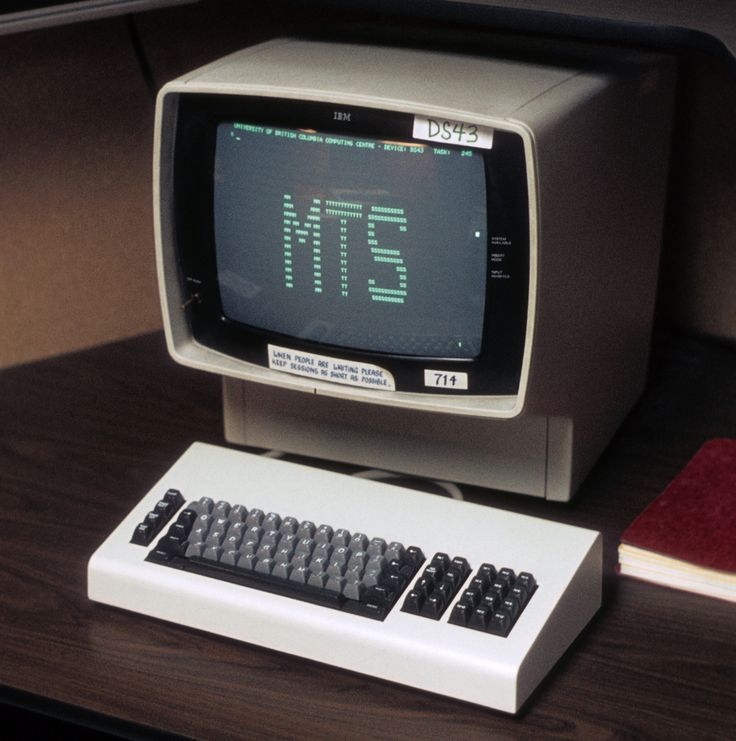
The IBM mainframes and their common terminals (the IBM 3270) natively use the “Extended Binary Coded Decimal Interchange Code” (EBCDIC, frequently pronounced “EB-se-dic”) character set, which is different than the ASCII character set used by most terminals at the time.
The 3270s were also “block-mode” terminals instead of the character-oriented terminals used in most dial-up environments.
All of the terminals described before - the teletype, LA-36, and ADM-3A, operated by sending each character to the computer when the key was pressed. (Effectively, it’s exactly how an ssh session works.) The terminal would send the character, and the computer had to read that character and deal with it when it was received. If it were a letter or number, it would usually just store it in a line-buffer. If it is the return key, it would process whatever was in that buffer. There are other control keys that would have different effects.
This adds some degree of overhead as the CPU is interrupted by every keypress by everyone connected.
A block-mode terminal had a full screen buffer in the terminal. You could type or make changes anywhere on the page1. Everything that you typed stayed in that terminal buffer until you pressed enter - at which time the entire buffer was sent to the computer to be processed. (In this case, this is like how your browser works when you’re filling out an HTML form.) Since the entire block is sent and received as a unit, it’s only one interrupt being handled for that block instead of one per character - a significant reduction of CPU load when servicing (potentially) hundreds of terminals.
Finally, the IBM terminal controllers use a different communication protocol than the typical modem.
The common modems of the time sent bytes as a start bit, seven data bits, a parity bit, and a stop bit. This allowed terminals (and computers) to send characters at arbitrary intervals. But it also added some overhead in that 10 bits were sent for each byte, or 25% more data than what is used.
Because the 3270s were designed to send a full screen of data at a time, the communications protocol was designed to optimize that. A block of data was sent within a frame, and within the framing, 8-bit characters could be sent as 8 bits per character, or 20% less data.
Because of those differences, a standard modem could not be connected to an IBM mainframe - and that is the purpose of the data concentrator. It could have standard modems attached to it, and it would handle all the conversions between what the terminals provide and what the mainframe expects and supports.
I point all this out because MTS supported both. They had something in the neighborhood of 200 modem lines for regular terminals and some small number of 3270s in the computer lab to go along with traditional terminals.
There were benefits to learning and using both. There was a full-screen editor available on the 3270 that was unique - at least compared to the line-editors common at that time. The full screen mode of the 3270 also made it easier to look at full 132 column output. On a typical video terminal, the output would wrap. This makes it more difficult to read column-oriented output. The 3270 had a horizontal scroll function, moving the display from columns 1 - 80 to show columns 53 - 132.
There were differences between the EBCDIC and ASCII characters sets. There are characters in EBCDIC that aren’t in ASCII, and vice versa.
For example, EBCDIC at that time did not have the square brackets ([ ]), braces ({ }) or the carat (^). On the other hand, ASCII doesn’t have the cent (¢) or the logical not (¬). The logical not was easy to remmember because it was mapped to the carat - making it easy to remember and recognize when working on an ASCII terminal.
MTS features
It was quite a change going from the HP to MTS.
Effectively being self-taught at this point, I struggled with a number of concepts. Frequently, I would give a concept, idea, or process a name that made sense to me, even if it wasn’t the correct name - then later, when I learned what the proper name was, would try to correct myself. (I wasn’t always successful) As a result, I may refer to something here by the name I gave it, rather than the correct name - oh well.
In the HP, you were always “in BASIC”. There was no separate shell or command mode. Editing was a matter of typing a line with a line number. It would either replace the existing line or add a new line. You couldn’t just change a character within a line. Some commands let you work with files (copy), others were edit commands (e.g. renumber or delete), and others were program-related such as run. There was no distinction among them.
MTS introduced me the concept of a mode. At the basic prompt, you were in “command” mode. If you ran the editor, it was “edit” mode. You always wanted to keep track of the mode you were in. Usually, you could rely upon the prompt, but I seem to remember there being some exceptions that could trip you up.
Files
File names were limited to 12 characters - twice the size of the HP.
There was no directory structure. All files were directly accessible by name.
Files had to be explicitly created before they could be used. You could specify an initial size and a maxsize. You would want to specify a maxsize when you had any idea how much data you think you’re going to have. Files could grow from the initial size, but only to the amount of space available on that disk volume. Also, since you pay for the amount of disk space you use, it’s helpful to put that upper limit on files to prevent programs from generating too much data.
You could reference another user’s files by using their account for a prefix. For example, my account name was SGMB (funny how I remember that). If I had a file named TEST_PROGRAM, and someone else wanted to access that file, they could reference it as SGMB:TEST_PROGRAM, assuming I had granted them permission to access it.
Temporary files could be created by using the hyphen (-) as a prefix to the name. These files would be deleted automatically when the terminal session or batch job that created them ended.
Public files used an asterisk (*) as the first letter, and could be up to 16 characters long (including the asterisk).
Line files
What impressed me the most for the longest time was the file structure of your typical text file - what MTS calls a line file and what you could do with them from the command line.
A typical file that you would use for your programs had line numbers, but they were metadata and weren’t actually part of the file. They were decimal numbers with 3 decimal places. This means that if you already had a file with line numbers 10 and 11, you could insert lines with numbers like 10.3, 10.4, then 10.31, 10.32, and so on.
Commands such as copy allowed for implicit file concatenation. You could do things like copy A+B C
You could reference parts of a file by using FNAME(start, end, increment). The special names *f and *l referred to the first and last lines.
You can combine these arbitrarily to do things like copy A(1,*l,2)+B+A(2,*l,2) C to copy all the odd numbered lines of A, then B, then the even numbered lines of A, to file C.
All commands that worked with these files could be manipulated in this manner.
MTS also supported sequential files, which did not have the line number metadata associated with them. I don’t think I ever used one.
Devices
MTS would identify logical devices as a filename enclosed by asterisks. For example, the name *SINK* is the name for the current output device. If you were running a batch job, that means the printer. If you’re running on a terminal, it’s the screen. But if you reassign it to a file, that sends the output to that file.
You also had devices like *DUMMY* (the “bit bucket”), *PRINT* and *PUNCH* (the line printer and card punch, respectively). Copying files to *PRINT* was the easiest way to print your files from a terminal without submitting a batch job.
Practical(?) application
In September ‘78, I started at U-M. The freshman programming class I took actually used AlgolW. And because of the To turn in an assignment for full credit, you had to submit an intact fanfold paper copy of the code and output. The leading and trailing banner pages would show the date & time that the output was produced.
It didn’t take me long to realize that if I ran a batch job from the terminal, sending the output to a file, I’d have a file containing complete banner pages. For each project, I’d run a job during the appropriate time window, and save the banner pages. I could then work on my program during my then-routine 11 PM - 3 AM window at home, and not worry about the actual date.
Once I had a functional program, I could capture the output, modify the headers and footers on each page to match the banners, merge it into the banner pages, and print the complete set. I’d then copy the output to *PRINT*.
Sending my output to the printer got laughs from the operators. They would see a header banner page, then flip through to find the trailing banner. I think they quickly realized what I was doing when they saw “header banner”, “header banner (different job number and date)”, code and output, “trailing banner (different job)”, “trailing banner”. I’d usually get a smile from the operator when retrieving the printout.
(In reality, it turns out that I never actually needed to do this.)
Languages, Languages, Languages
MTS had a boatload2 of different languages available, not counting the basic variations of each. For example, they had no fewer than 4 different Fortran compilers, two assemblers, two Algol compilers, BASIC, COBOL, Pittsburgh Interpretative Language (PIL), SNOBOL - and those are just the ones I remember playing with.
What I really wanted to do was to translate my pet projects from the HP-2000 to as many different languages as I could, to get a feel for what made them different from each other. This experiment was not successful. The biggest difficulty for me is that the only references I had for most of these languages were the reference manuals. Tutorial or educational information for most of them was either extremely difficult to find or prohibitively expensive for a then-unemployed college student.
I had my Fortran tutorials from the high school and the AlgolW from class. PIL was close enough in spirit to BASIC that I had no problem there, either. As for the assembler and COBOL - no chance.
Working in Fortran introduced me to the concept of a core dump. I already understood the distinction between a compiler and an interpreter. I knew that the Fortran compiler produced machine code, and it was that code that was being run. If there was a serious flaw in the program (like a divide by zero error), the output would be pages and pages of the hexadecimal representation of the memory being used by that program.
I knew hex well enough to find my data arrays (I think), but didn’t understand the system well enough to take advantage of the other information provided. I knew that at some point in time this would be something I’d really want to learn.
Documentation galore
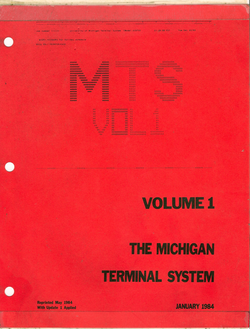
The documentation was fantastic. Every component or customized system had its own manual available, and they could be purchased through the university bookstore - quite reasonably, too. They apparently were published at the university.
They weren’t professionaly typeset and bound, instead they were obviously computer printed and bound 3-hole. I think most of them cost between $5 - $10 range, which seemed a little high at the time (1978) - but it was well worth it for me. I think I ended up buying about 8 of them for use at home.
Even though they were typographically primitive, overall I still easily consider them to be among the best program documentation I’ve ever read.
Moving sideways?
I never completed my first semester - I formally dropped out the last week when I could drop out before my record became “official”.
This did not mean I stopped accessing the system, but my focus changed. Along the way I had discovered that there was a host of “non-programming” software available on MTS, like the simulation language GPSS and the data analysis system MIDAS. I spent a lot of time playing with them and other system utilities. I still had things I wanted to do, but discovered I didn’t always need to write code to do them.
Moving forward?
I had no way of knowing it at the time, but working with MTS gave me a unique perspective (for the time) for how you work with computers. The editor and command line features really spoiled me for a long time. It would be about 8 years before I worked on a computer again that felt as powerful from the user’s perspective as MTS.
Still available today!
Around 2000, I became familiar with a mainframe emulator called Hercules. You can emulate a complete IBM 360 or 370 system, running classic IBM OSs from the 60s and 70s. In 2011, the U of M released MTS archives containing usable MTS tape images. I, among many others, managed to get it running on Hercules. It was a real nostalga trip! I encourage anyone interested to take a look at Try MTS
If you want to see what really good documentation looks like, the manuals are also available in a variety of places online. (See Bitsavers among others.)
And now, I have to admit, writing this post has reignited my interest in restarting my MTS instance…
-
This is an incredible simplification of the real situation. However getting into those details is not useful here, yet. ↩
-
There are other, more precise terms that I would typically use here in the absence of having an exact number, but “boatload” is good enough here. My guess is that there were easily 20 to 25 languages available(counting variations), and another 10 or so specialized programs for particular domains. ↩