A technical career retrospective part 11
IBM DB2: 1986 - 1992
Why this post?
IBM DB/2 was new to Monumental Life (MonLife) in 1986. There was a major effort to modernize a number of applications to take advantage of the technology. This led to a lot of work in a number of different areas. I had never worked with a relational database before - but then neither had most of the other programmers there.
During this period, there were other architectural changes in the environment that I skipped in the previous post.
TL;DR
DB/2, CICS, and 31-bit addressing round out my MVS education as a mainframe application developer.
DB/2
Introduced to relational databases
One of the applications selected for migration to DB/2 was the system I was working on. I was selected to be part of the team responsible for designing the databases.
The first part of this project was learning about the Normal Forms for managing data in a relational database. While there were 7 recognized forms at the time, only the first 3 were considered important enough to us to enforce.
After going through the training, I was selected to participate in the design of the database tables for the system I was supporting. We met as a group, offsite, for a full week to work through the process of looking at our file structures and mapping them to a set of database tables.
While I don’t remember any of the specifics of the files or tables, I do remember the process and the nature of the discussions. It’s a general process that I’ve used since then when designing databases, and has always produced acceptable results.
Using DB/2 with COBOL on MVS
Extra steps were required to use DB/2 in a COBOL program. Elements like SQL statements and cursors weren’t a part of the language, and so making them available within COBOL had to be done outside the traditional compilation proccess.
Variables had to be defined in your program for every column being retrieved in a query. IBM provided a tool, dclgen, that would generate a COBOL structure for a table or view. That code would then be placed in a “copybook” to be included in programs accessing that table. (Effectively the same as the C #include statement)
In the program, SQL statements would be enclosed between EXEC SQL and END EXEC statements. A DB2 preprocessor would be run to convert that block to a standard COBOL CALL statement, It would also create a separate Database Request Module (DBRM) containing the actual SQL statements. The output from the preprocessor would then be compiled and linked to create a standard executable program.
The DBRM was used in a separate “Bind” step. During the bind, the SQL would be verified both for syntax of the SQL itself along with verifying that the tables, columns, and referenced data types are all correct. It also verify that the account running the bind has the appropriate privileges to execute those SQL statements.
Finally, the query optimizer would create the access plan to determine how DB2 would perform the actual query. This query plan would be used when the query was being executed, preventing any need for the planner to be run when the program is being run.
This separate bind step created some extra work managing the production environment, but also provided a clear separation of duties between the programmers and the operations / database administrators.
From the programmer’s perspective, it didn’t really affect much. The complete compile, link, and bind process in development didn’t take significantly more time, and didn’t produce that much more output needing to be checked.
Using DB/2 interactively
There were two different ways to access DB/2 interactively.
The “standard” tool was the SQL Processor Using File Input (SPUFI). As a terminal-based tool, it displayed an edit page for a dataset or PDS member. The SQL statement would be entered. When the editor was exited, the file was saved and passed to the DB2/2 processor. It would then open the output file in browse mode to review the results.
It was common to create a PDS containing a large number of different queries that could be run quickly. There was an option within SPUFI to run a query without editing it first, providing the ability to create a library of frequently-used queries.
There was a separate tool named QMF (Query Management Facility) designed more as an end-user tool. It was more of a “report-building” tool focused on directly creating reports with formatted output like control and page breaks, headers, and footers. It also provided its own storage facility for running and saving queries.
Other topics
CICS
As a developer or other “general purpose” user, the typical means of using the mainframe interactively was logging on to TSO (Time Sharing Option). However, this doesn’t scale well in a production environment because each TSO session is a unique process, with its own memory allocation. It would be wasteful to purchase a mainframe large enough to support hundreds of TSO users who are only using the system for data entry.
IBM had a product called the Customer Information Control System (CICS) which served as a monitor program for other modules. Those modules, known as transactions, would run within CICS. Users would all connect to one CICS instance to run their transactions. This avoids the overhead of individual processes being started for each connection, and reduces the memory requirements of having 100 people all using the same program.
In general, a transaction would display data, and optionally define fields for data entry. When the screen was submitted, the transaction would validate the input, usually save the data, and display a new screen.
About 10 years later I would see the parallels between this, the then-new http protocol, and the web servers being developed to support it.
Memory addressing
The evolution of the IBM OS/360 series of operating systems is an interesting study in itself, but a topic I’m not going to discuss here. (I find it amazing that code written and compiled 60 years ago for the very first IBM OS/360 might still be able to run natively in z/OS today. That’s an incredible testament to the flexibility of the architecture.)
One early architectural limitation of the CPUs in those systems was that addresses were 24 bits in length, limiting addressibility to 16 MB. (Keep in mind that the very first releases of OS/360 was designed to run in systems with as little as 128 KB of memory, but generally up to 1 MB.)
As the systems continued to grow and evolve, that 16 MB address limit became a problem.
MVS introduced the ability for each process to have a separate 16 MB address space. The physical system could have more than that, but each process could only reference 16 MB. That 16 MB boundary became known as “the line”.
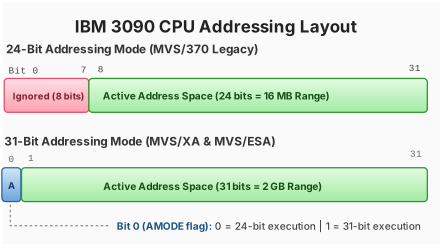
As software and data requirements grew, this became a more significant issue. In 1983, IBM released hardware and software upgrades that allowed for 31-bit addresses, expanding the addressible memory to 2 GB. Code using 31-bit addresses internally was said to be able to run “above the line”.
Why a 31-bit address instead of a 32-bit address? IBM decided that the easiest way to maintain compatibility with older software was to use that first bit as a flag to indicate the type of address being used. If a process is running in 31-bit mode and bit 0 == 0, then the address is a 24-bit address and the other 7 bits of that byte would be ignored. If bit 0 == 1, then the address is a 31-bit address, and the other 7 bits of that byte are part of the address.
But why was it necessary to ignore that first byte? Again, it’s a historical artifact from back when memory was extremely tight. Developers learned to use that first address byte for other purposes. It was not uncommon to use them for internal status indicators within the code. In those situations, that first byte would not necessarily be 0, creating an error if those bits were used as part of the address.
In the mid-80s it was necessary to manage software modules using a combination of 24 and 31 bit modes. It was possible to modify code that could only run below the line access data that was above the line. As long as those modules didn’t use those high-order bits for other purposes, that was one of the easiest changes to make, and moving I/O buffers above the line was a quick win in a number of situations.
But when you’re linking modules together, they had to agree on the addressing mode being used. If a module using memory above the line is linked to a module not using it, then that other module may be unable to access data allocated by the first.
My recollection is that it wasn’t much of a problem for the team I was on. I don’t recall any of the programs that I worked on needing to use 31-bit addresses.
Moving on
In February 1988, I was transferred from the programming department to the systems shop. I was expecting to start assuming some responsibilities over the maintenance and configuration of the mainframe. But the rapid growth and adoption of PCs in the company was soon to move my career in yet another direction - but that’s a story for later posts.