A technical career retrospective part 12
PC Support part 1: 1988 - 1991
Why this post?
Many larger companies were slow adopting PCs at the corporate level. The terms “End-User Computing” (friendly term) or “feral systems” (unfriendly) were used to describe the growth of PC usage in companies outside of the traditional “Management Information” department.
Monumental Life was no different. The most “forward-thinking” departments were elsewhere in the building.
At some point, senior management realized that there should be some coordination among these deparments, and one of the needs was for some type of internal technical support that could provide assistance when needed. That’s when I got tapped on the shoulder…
TL;DR
PC usage at MonLife explodes, and I was one of the first to provide technical support at the company level.
“Technical Services, How may I help you?”
To be clear - I was nowhere near being expert in PCs at the time. (This was still during my peak Atari ST period.) Every department that had invested in PCs had at least two people with significantly more knowledge than I had.
Multiple departments had the Wang Word Processing system. One department had their own Arcnet network for file and print sharing. Some had Irma cards installed, allowing a PC to access the mainframe instead of the 3270 terminals.
Many different brands were purchased throughout different departments - usually based on whatever local vendor they contracted with. I remember encountering all of IBM, Compaq, HP, Dell, Toshiba and Gateway 2000 systems during those early years.
Our task was to support these as best we could. In most cases this involved configuring the systems, diagnosing problems, or answering operational questions. We would also get asked for hardware and software recommendations for specific purposes.
On more rare occasions, we needed to get involved with more custom programming to address specific needs within the company.
Memory
A recurring theme throughout most my time in those early years was memory and system configuration.
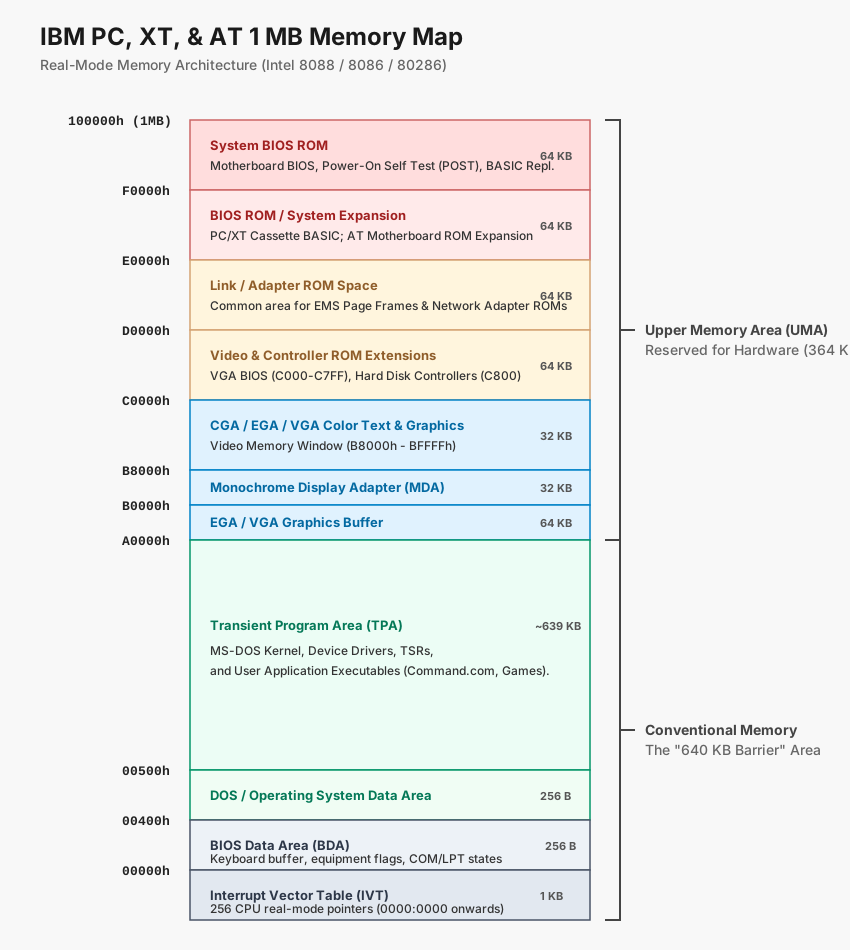
I started working with PCs with MS-DOS 3.3. The 640 KB limit was quite real at the time, and the 8088 CPU that MS-DOS was written for had no way to go beyond that.
The 8088 could only address 1 MB of memory (20-bit address, or 1024 KB). When the IBM PC was being designed, the top 384 KB was reserved as three 128 KB blocks, one each for the BIOS and ROM, plug-in cards for the slots, and video memory mapping. That address space was known as the Upper Memory Area (UMA)
In 1985, a standard for “Expanded Memory” (EMS) was created, allowing for additional memory to be added to a system. This memory was accessible in 64 KB chunks, mapped to a portion of the UMA. This additional memory was used primarily for storing data, expecting that the code would always reside in the base 640 KB region. While custom code that carefully managed those pages allowed for code to be saved and run from that region, this was rare.
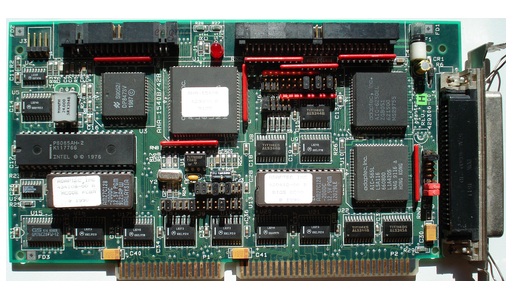
The 64KB frame being allocated had to align on a 16KB boundary within that upper memory. But it wasn’t always easy, as different cards - or even ROMs - tended to use arbitrary ranges in the UMA. Most decent cards had some degree of flexibility regarding their configuration. For example, both the original IBM Token Ring card and the Adaptec AHA-1542 SCSI disk controller needed space in the UMA for their ROMs and/or I/O transfer buffers.
Trying to make a number of different cards all work together was sometimes a bit of a jigsaw puzzle. It was necessary to know all the possibilities for each card, then find the combination making everything fit.
I/O Ports
It was also necessary to ensure that the I/O ports didn’t conflict, but this tended to be less of an issue. The original IBM PC and XT only used the lowest 10 address lines for those ports, providing 1,024 ports. Of that, 512 were reserved for the motherboard’s components and the other 512 for expansion cards.
Many of the ports used were standard or at least became de facto standards. For example, every serial port card allowed for ports being selected among the set 3f8, 2f8, 3e8, and 2e8 for COM1 - COM4 respectively. Specialty cards might provide options beyond that, but you could count on those ports being available options.
Conflicts tended to be rare, and only in those cases where a system needed more than one card of a given type installed.
When the IBM AT was released, it opened up the full 16-bit I/O port addresses, allowing for 65,536 ports to be used. This should have eliminated any reasonable contention among the I/O ports for any given system. However, some cards were designed around the original 10-bit port address limitation, which meant they would also respond to any I/O requests where the port number has the same lower-order 10 bits. (e.g. A serial card listening to port 3f8 would also accept commands on 13f8, 23f8, and so on up to f3f8.)
IRQ lines
In addition to the I/O ports, many devices also needed to use an Interrupt Request (IRQ) line to signal the CPU when something needed to be done. There were 16 lines total, but most were used by standard devices such as the keyboard, disk controllers, serial and parallel ports. Once all the typical devices were configured, there would usually be only 3 or 4 IRQs available.
DMA Channels
Some interface cards could transfer data to/from the system memory directly, without the CPU needing to be involved. DMA channels were extremely limited, and typically reserved for situations where high-speed transfers were critical. (The Adaptec AHA-1542 SCSI disk controller being a notable example.)
An IBM PC or XT usually had one available DMA channel. The IBM AT and clones had 3 16-bit and 3 8-bit channels generally available. But, it would have been highly unusual to need more than these.
In a single-tasking operating system such as MS-DOS, the benefits were marginal. The advantages weren’t really seen until multi-tasking systems became common. An exception were the sound cards. A game could instruct a sound card to read sound data from memory directly, allowing the sound to be played without requiring CPU involvement.
System settings
Once a valid configuration has been identified, the cards would be configured - usually by either jumpers or switches. Then, the software drivers may need to be configured for programs to be able to use those devices.
There were no real standards for this. The settings could be in device drivers defined in config.sys or loaded by autoexec.bat.
Hard drive interfaces and capacities
Another area with a lot of growth and change were the hard drives.
The original IBM PC/XT and PC/AT systems were shipped with hard drives ranging from 5 MB to 20 MB using a connection and encoding known as MFM (Modified Frequency Modulation). The connection between the hard drive and the controller card was through two separate ribbon cables, and a third connection to the power supply. One of the two ribbon cables would have a second connector to attach a second hard drive, but use a separate cable for the second connection.
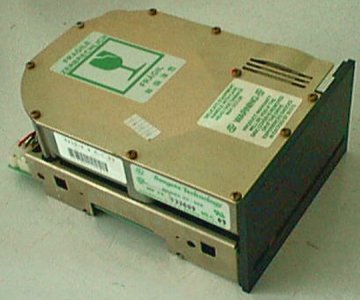
The hard drives themselves were pretty much dumb devices. All necessary logic was in the controller card.
As a result, one of the requirements involved “parking” the read/write heads before powering off the computer. When the power was turned off, the heads would drop onto the track where they were currently located. Parking a drive would move the heads to a safe location, reducing the chances of a “head crash” - the heads landing on an area of the disk where data was stored, possibly damaging it at that location.
In the mid-80s, a second type of encoding was developed, known as RLL (Run Length Limited). This involved a change only in the controller card. An RLL controller could replace an MFM controller, connecting to the same drives. The RLL controller increased disk capacity by at least 50%, but not all drives were manufactured to the standards necessary to support it.
Drive manufacturers soon started identifying the drives that could handle RLL either by changing the model number or adding an “R” suffix to the model number, or both. For example, a very common drive at the time was the Seagate ST-251 40 MB drive. The RLL version was labelled as the ST-277R, and could store 65 MB. There was only about a 10% difference in price, so buying the newer RLL drives were much more economical.
In 1987, Seagate released the ST-251-1 as a faster and more reliable replacement for the ST-251. People soon discovered that it was also a more reliable drive on an RLL controller than the designed-for-RLL ST-277R!
When the IBM PS/2 was first released in 1977, they used MFM drives. But by the time I started working with them in 1988, they were using an IBM-proprietary interface called “Enhanced Small Disk Interface” (ESDI). The PS/2 was the only series of PCs that I knew that ever used them. They were good drives - I never saw any real problem with them, but they were expensive to replace or upgrade.
Small Computer System Interface (SCSI)
The final type of hard drive I worked with were those using the Small Computer System Interface (SCSI). These drives were unique at the time in that each drive had a controller on the drive, and could process requests independent of the controller.
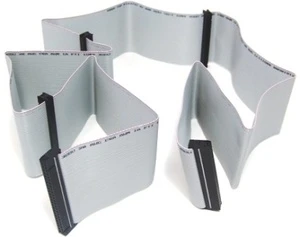
An original (SCSI-1) controller could have up to 7 drives attached. Internally, the drives would be connected by a multi-connector ribbon cable. External drives typically had two connectors, allowing multiple drives to be chained together.
A controller could issue a command to one drive, then “disconnect” from the drive to issue a command to a different drive. Each drive could then transmit data back to the system when the operation was complete. Each drive would control the bus only during those times when it was transferring data on the bus.
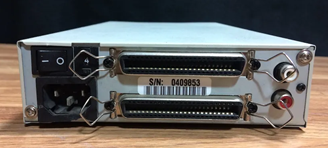
This ability to interleave operations among devices was a significant performance benefit in a multi-tasking environment - which MS-DOS was most certainly not. However, even in a single-tasking environment, the data transfer rates on a SCSI-based system was faster than the other interfaces. The more “performance constrained” departments found it worthwhile to invest in SCSI equipment for their computers.
But, what made SCSI so impressive at the time was that it was usable by devices other than hard drives. It was truly a general bus for multiple device types. There were RAID enclosures that could be connected, where the RAID controller was a single device from the perspective of the host controller. Tape drives and CD-ROM were commonly available with SCSI interfaces. There were even high-end scanners and printers using it. In essence, it was the parallel interface version of the yet-to-be-invented USB port.
Side note: SCSI was the standard interface for the Macs in the late ’80s through the ’90s, but I wasn’t aware of that fact at the time.
The IBM PS/2
In 1984, IBM had more than 60% of the PC market. By 1987, that had dropped below 40% as numerous companies began selling fully-compatible systems for significantly lower cost. To try and take control back, they introduced the PS/2 line of computers with a new bus known as the Micro Channel Architecture (MCA).
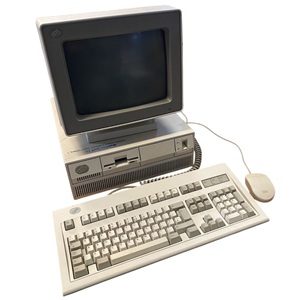
The MCA had significant advantages over the original ISA (“Industry Standard Architecture”) bus, both in transfer rates, data width, bus control and configuration.
Every card could be configured via software - there was no need for the jumpers and DIP switches to set things like I/O ports or IRQ settings. Everything was done automatically by software, with the system determining what the allocation would be for I/O ports, IRQ lines, and UMA addresses, writing the configuration in its bios settings.
Another technology advancement of the PS/2 was that it integrated the VGA video controller on the motherboard, providing a native 640x480 16-color graphics mode without an extra video card.
It was also the PS/2 that brought the 3.5-inch 1.44 MB floppy disk drive to the PC market, quickly making the 5.25-inch 360 KB floppy obsolete - even on ISA-based systems.
There were three major downsides to the MCA.
First, it was a completely proprietary bus. Card manufactures had to pay patent license fees to IBM to be able to make and sell micro-channel cards.
Also, as a new bus, it was completely incompatible with the ISA bus. This meant that replacing an ISA system with an MCA system involved replacing all cards you might be using as well.
Finally, the built-in VGA turned out to be a hindrance, as the clone market started selling video cards capable of displaying 800x600 less than a year after the introduction of the PS/2, and could display 1024x768 the year after that.
The PS/2 was a fine system, but the costs and limitations pretty much limited them to corporate environments. I don’t know anyone who purchased a PS/2 for personal (non-business or non-company) use.