A technical career retrospective part 13
PC Support part 2: 1988 - 1995
Why this post?
Networking grew rapidly within MonLife. One department led the way - demonstrating the value of multiple systems sharing resources. PCs were being deployed most everywhere, for word processing, spreadsheets, and database applications. A more collaborative work environment was on its way.
TL;DR
Technical Services was tasked to help design and implement networking across the company, and I was one of a number of people involved in this project.
Disclaimer
I don’t have anything in my personal archives showing dates for when most of this work was being done, so putting these items in strict order is impossible. Many of these overlap to some degree, but I’m fairly certain that they were all completed before 1992.
Expanding connectivity
It was our marketing department that lead the way. They purchased their own Netware file server, and installed their own arcnet network within the department. They also developed their own dBASE applications for the department.
Novell
Given the demonstrated success of Netware in the Marketing department, Novell was the obvious choice for the company.
Building a server
Installing Netware 2.15 in 1989 was not a trivial operation. It didn’t have any kind of loadable modules or module configuration options. A regular DOS system was needed to compile and link the device drivers to build the OS. Changing a network or disk controller card, or changing an IO port for a printer interface required a complete rebuild.
This build process typically involved swapping a variety of the 20+ disk Novell package more than 40 times - and making a mistake would usually require restarting the process from the beginning. Running the full process required more than an hour.
Another time-consuming step was the process to prepare the hard drive. Netware used a proprietary disk format, and required the drive be scanned and tested before being formatted to locate bad blocks. This testing process could take more than a day for larger MFM drives as every block had to be written and read multiple times. (At least that didn’t require any manual intervention. Start the process then go away. Come back much later to find it done.)
Network configuration
Netware used a proprietary network protocol, IPX. An IPX address was composed of two parts, a 4-byte network number and a 6-byte host number.
The network number was arbitrarily assigned during configuration. All computers on a network segment were required to use the same network number.
If you moved a server from one network to another that already had a server on it, the server being moved needed to be reconfigured using the build process described above. Yes, the entire process had to be performed just to change the network number.
The host number (by default) was the MAC address of the network card.
This made client PC configuration trivial. A PC connecting to the network could determine the network address from a server on that segment and use its own MAC address for the host number. (At the time, it was considered inconceivable to have more than one network card manufactured with the same MAC address.)
Network topology
Token Ring
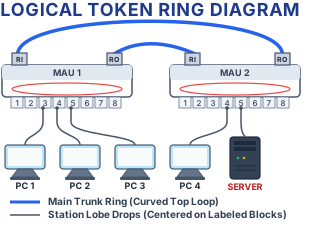
As an IBM shop, we were sold on the benefits of Token Ring over Ethernet. In theory, a token-ring network is more stable under heavy loads, providing more consistent throughput.
A token-ring network is physically implemented in a star configuration.
Each workstation was wired to a central hub, known as a Multi-station Access Unit (MAU). A typical MAU had 8 workstation ports and Ring-In (RI) and Ring-Out (RO) ports.
Multiple MAUs could be daisy-chained together to create rings with up to 255 workstations.
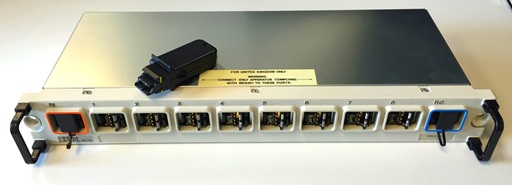
Token ring was named for a special type of packet known as the token. There was only one token allowed on the ring, and the only system allowed to transmit was the computer with the token. After a packet was sent & acknowledged by its recipient, the token was passed along to the next station in the ring.
This protocol did provide stability on a very busy network, but limited the throughput when the network wasn’t busy. If only one computer needed to send data, it still had to pass the token around between packets.
Physical layout
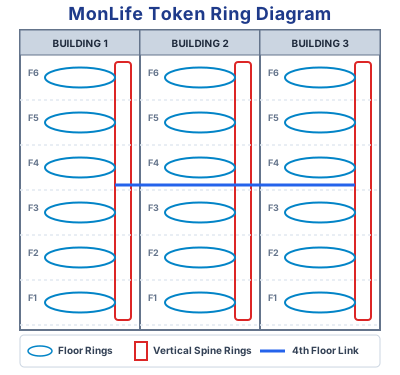
The complex occupied by MonLife was actually four separate buildings joined together, built over a span of about 40 years. (These buildings were commonly referred to as the “old”, “middle” (2 buildings), and “new”.)
Each building had its own vertical columns for wiring and infrastructure (stairwells, elevators, etc). As a result, we tended to think vertically about how to implement the network.
The computer room was on the 4th floor in the old building. All of the 3270 terminal cables were already run to the computer room, so it was also to be the central networking hub.
Logical layout
What we decided upon was a ring for each floor in each building, bridged to vertical rings connecting all the floors together. Those three rings were then connected to an extra ring in the computer room.
Bridging two Netware networks together required installing the bridge software on a PC having two network cards. This process was similar to building a server in that it was a fairly detailed process that was easy to mess up. Also, it meant that if you moved that computer to a different location, the software would need to be configured for it.
What I believe we ended up doing was creating diskettes with the software for every combination of networks being bridged. We then kept one diskette in the system being used as the bridge and one in the office as a spare. This also meant that we had to standardize the configuration of those bridges. Every bridge needed to have the same model cards configured the same way.
Problems
The most serious issue I remember was a recurring problem known as “beaconing”.
A problem would occur when there was a wiring issue somewhere. It could be caused by a loose connection, or a connector pulled, or a network card failing.
Regardless of the cause, workstations would start sending diagnostic packets continuously, trying to get the ring operational again. But since there was an electrical issue, the ring itself was corrupt - preventing all nodes from working.
In many cases, fixing this was an issue of trial & error.
- Take a laptop to the wiring closet where the MAUs were and plug it in.
- Run a network monitoring tool.
- Unplug ports one at a time until the network stabilized.
- Find the PC at the other end of the connection and try to diagnose it.
I don’t remember exactly how often this happened, it might have only been once a month or so. But when it happened, it disrupted the entire ring and was generally difficult to isolate.
Features
When PCs were first being deployed, IRMA cards were purchased to allow those computers to be used as 3270 terminals. (An IRMA card was an interface card that could be connected to an IBM mainframe through the same coax connection as a real 3270 terminal.)
Once the network was installed, an IBM terminal controller was also connected to the network. This allowed PCs to run 3270 emulation software without needing the IRMA cards. The individual PCs would connect through the Novell Gateway software, removing the need to configure each PC for a particular mainframe connection
Field Offices
The company decided to create a system for the field offices to give them access to current data for their customers.
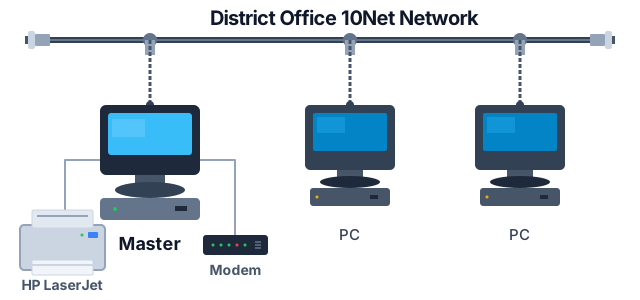
After some research, we selected the 10Net peer-to-peer network as the basis for those offices.
This used standard RG-58 coax cabling with the T connectors for each port and terminators on each end.
The cabling was run through the office with drops installed at the desks for the workstations.
Even though the network software was peer-to-peer, we were effectively setting them up in a client-server architecture.
Each office was going to get one “master” PC that would work like a server. It was a workstation for office staff to use, but it also served as the file server for the other PCs in the office.
The other workstations would run the applications, accessing the applications and the data from the server.
A set of applications were developed for the offices to be able to provide information and to enter certain transactions.
The software behind all this deserves a post of its own - coming up next.